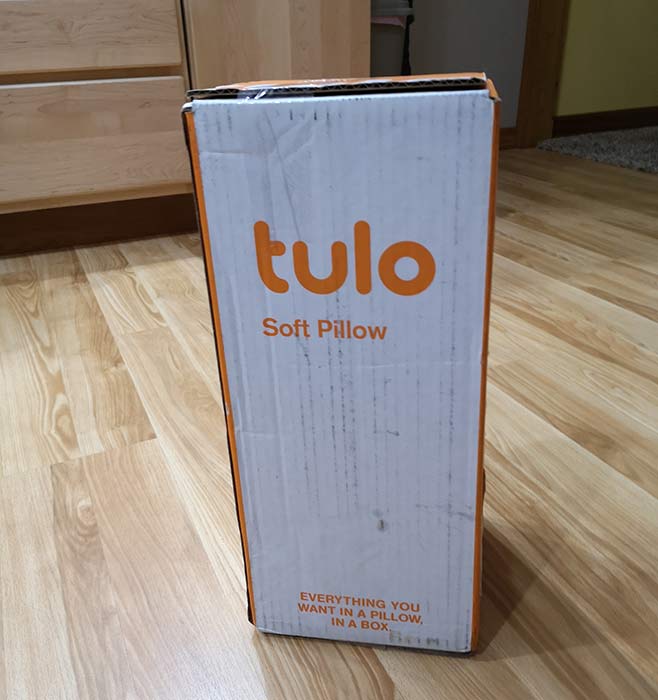
tulo pillow review

REVIEW – I’m on a quest. But it’s not for the best smartphone or the best gear bag. I’m on a quest for the best pillow and the latest pillow to cradle my head while in gentle slumber is the tulo pillow. Will it be too hard? Too soft? Or will it be just right? It’s time to find out.

What is it?

tulo means “sleep” in Chichewa which is a language spoken in Zambia, Malawi, Mozambique, and Zimbabwe. tulo is also a pillow that is made of high-density foam that is infused with particles of titanium. No, I’m not kidding. It also features an AquaCool phase-change material designed to keep you cool. That’s a lot of tech for something that isn’t powered by a battery.

Design and features
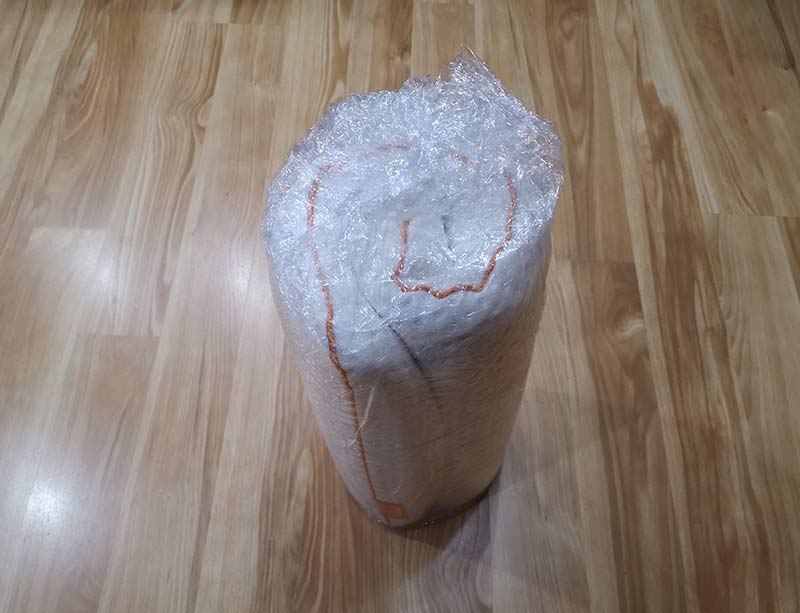
The high-density tulo pillow arrives in a surprisingly non-pillow shaped box. Opening the box reveals a compressed “jellyroll” pillow wrapped in protective plastic.
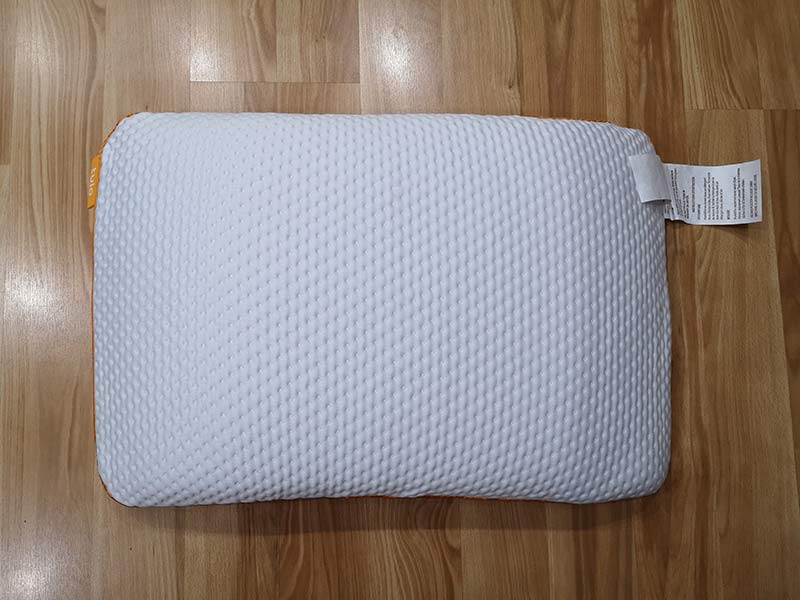
When unwrapped, the pillow unfurls into a  16″L x 26″W x 5″H form factor which fits into a standard-sized pillowcase.

I was sent the soft version of the pillow, but the tulo also is available in a medium and firm version. Choosing the firmness level depends on your typical sleeping position. Soft is for stomach sleepers, medium is for back sleepers, and the firm version has been designed for side sleepers. Even though I sleep on my side, I opted for the soft version of the tulo because I like a soft pillow.
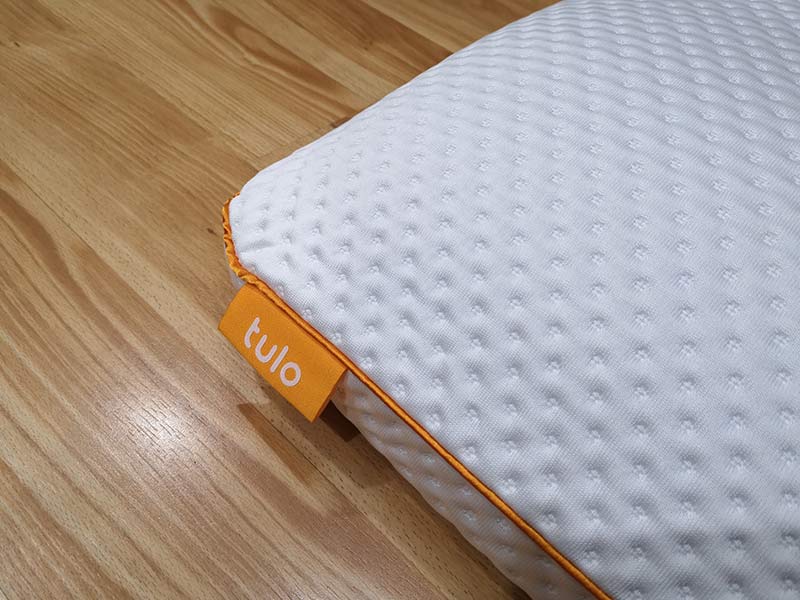
The outer cover of the tulo pillow is a soft dimpled material with an orange piping around the sides and a tulo branded tag sewn into the seam.
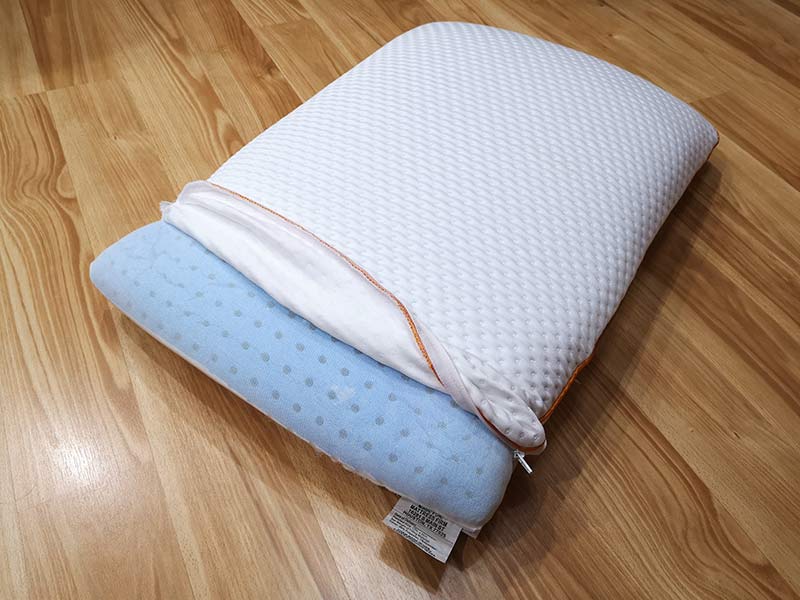
The cover unzips to reveal the foam pillow. One side is blue as shown above. I’m assuming that this side is the side with the AquaCool phase-change material that is designed to keep you cool. The tulo website and the materials included with the pillow do not offer any details about this special material except that they say that it’s a super conductive highway for heat flow.
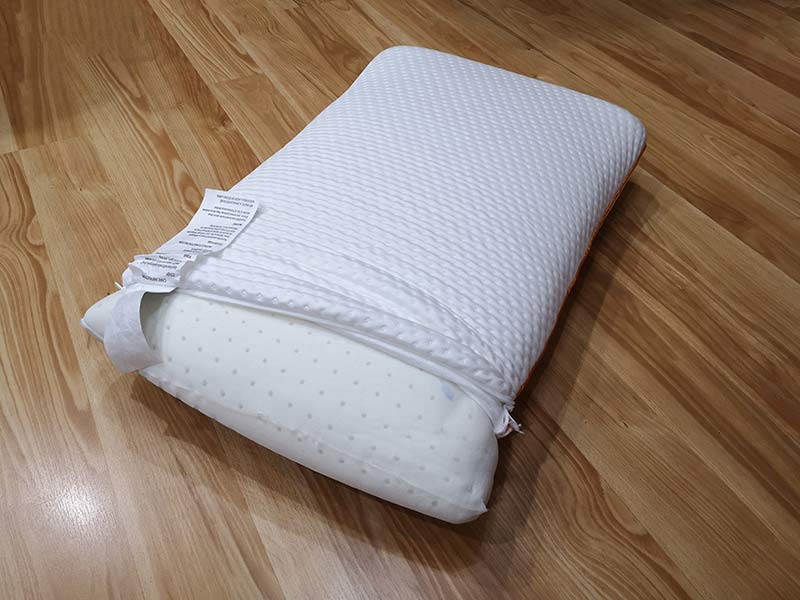
The same is true about the opposite side of the pillow which is white. This side might be the one that is infused with particles of titanium. But again, I can’t find any details about the benefits of this “feature”.

Can you throw the pillow in the washer to clean it? Nope. The zippered cover can be washed, but the pillow itself can only be spot cleaned with mild soap and water, and then air dried.

Time for a snooze!

I’ve mentioned in some of my other pillow reviews that I’m like Goldilocks. Pillows are either too hard, too soft (rarely), and almost never just right. That’s why I’ve continued to sleep on the same pillow for too many years now because I just can’t find a new pillow that is as comfortable as my current one.

As for the tulo, I was happy with the height of the pillow. That tends to be my main complaint when it comes to trying new pillows. They are usually too high and cause my head to raise at too much of an angle when I’m sleeping on my side. The tulo didn’t have that issue, so it got an immediate thumbs up. Laying on the pillow supported my head and neck at the perfect angle and also didn’t bother my shoulder.

What about the AquaCool and titanium particles? Did they keep my head cool while sleeping on the tulo? Well, I didn’t wake up with a cold head or a hot head. I woke up with my head feeling just right. Yes, we’re using the Goldilocks reference again. So a thumbs up for the special materials too – I guess. Seriously though, I don’t the pillow has a super conductive heat highway. It just feels like a pillow as far as coolness goes.

Unfortunately, that was where the happiness ended because the tulo pillow didn’t live up to its “soft” name. It felt one level too firm for me. If it were just a bit softer, it would be a keeper.

What I like

  • Right size and right height
  • Washable cover

What to watch out for

  • Can’t be put the pillow in a washer or dryer
  • Soft version of the pillow wasn’t soft enough for me

Final thoughts

I realize that pillow firmness is subjective and everyone will have their own comfort level when it comes to a pillow. That said, of all the pillows I’ve tried in the past year or so, the tulo is the one that comes closest to replacing my antique pillow. The tulo is well made and comes in at an affordable price, so it is worth a try if you’re also looking to replace an older pillow.

Price: $89.00
Where to buy: tulo.com and Amazon
Source: The sample for this review was provided by tulo.com.

Filed in categories: Reviews

Tagged: ,

tulo pillow review originally appeared on The Gadgeteer on July 25, 2018 at 1:00 pm.

Note: If you are subscribed to this feed through FeedBurner, please switch to our native feed URL http://the-gadgeteer.com/feed/ in order to ensure continuous delivery.
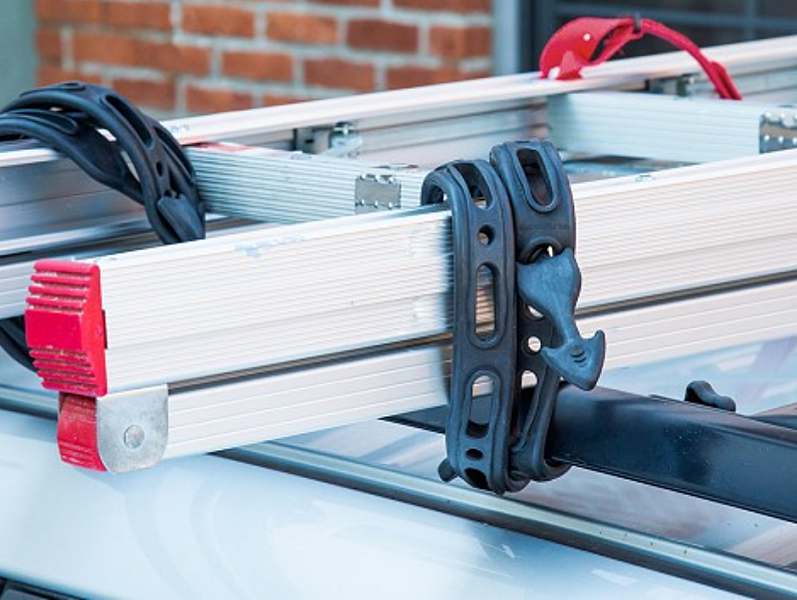
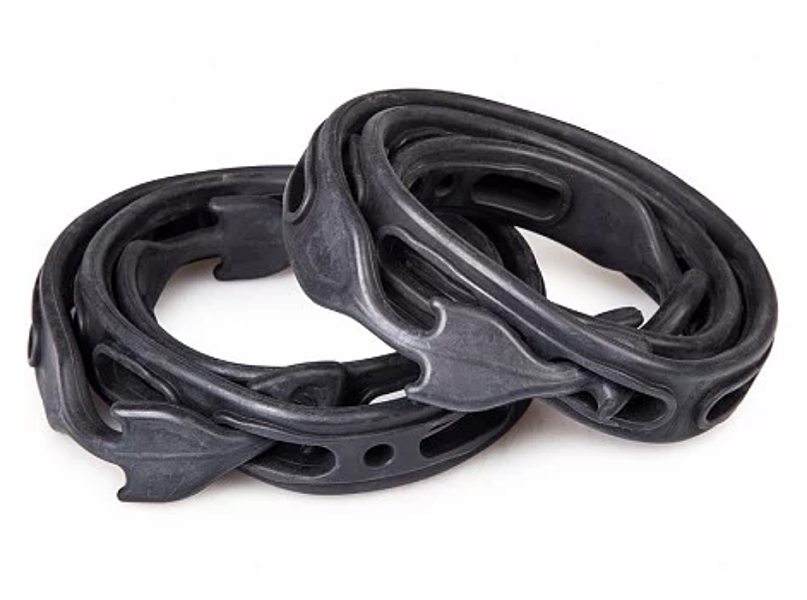
The Quickloader Strap is an all rubber take on the traditional tie down

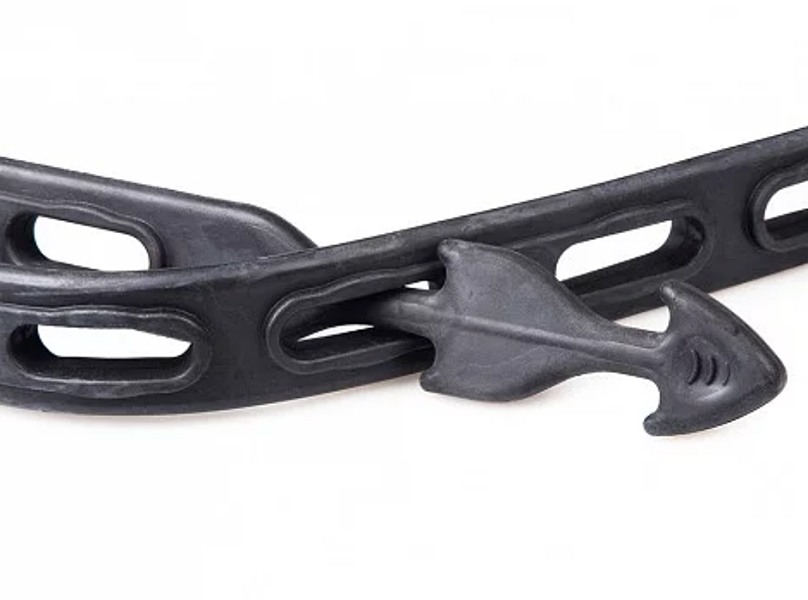
NEWS – If you’ve ever had to move something from here to there, you know the importance of making sure whatever you’re moving is secure. Traditional tie downs are okay, but most of them contain metal or plastic hooks that can be damaging. The Quickloader Strap does all the same securing and carrying jobs that a traditional tie down does but without the use of any metal parts.

Quickloader Straps are made of a durable, lightweight rubber. The flexible rubber makes them adaptable to just about any loading task. And because they are completely made of rubber, there’s no worry of damaging or scratching items.

The straps are made of 100% EPDM rubber and will never Harden or crack.

Each strap measures 43-inches in length, but they can be connected to increase the tie-down length by two or three times.

With a workload limit of 55-pounds and a break strength of 110-pounds, the Quickloader Straps are very durable.

The Quickloader Straps come in packs of two for $19.95 and are available on The Grommet.

Filed in categories: News

Tagged:

The Quickloader Strap is an all rubber take on the traditional tie down originally appeared on The Gadgeteer on July 25, 2018 at 12:00 pm.

Note: If you are subscribed to this feed through FeedBurner, please switch to our native feed URL http://the-gadgeteer.com/feed/ in order to ensure continuous delivery.
Jabra Elite Active 65t true wireless earbuds review

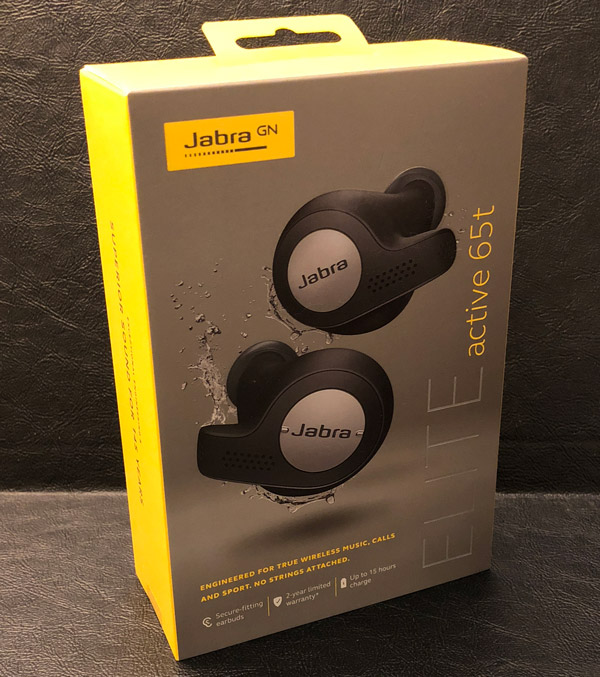
REVIEW – Earlier this year I reviewed Jabra’s Elite 65t earbuds, their latest high-tech truly wireless headphones. Jabra has packed a long list of features and excellent sound into a tiny, secure, and comfortable package. The Elite 65t’s have a water resistance rating of IP55, engineered to withstand normal use and moderate exercise but I hesitated to use them during epic workouts in fear of damaging with sweat. Jabra has recently released their more exercise-centric sibling: the Elite Active 65t’s which have a IP56 water resistance and are engineered to survive many sweat-soaked efforts. Let’s see how well they fair against their (nearly) twin sibling.

Since the Active version of the Elite 65t’s is nearly the same in terms of form-factor and features, I will be plagiarizing myself from my original review and focusing on differences between the two variants.

What is it?

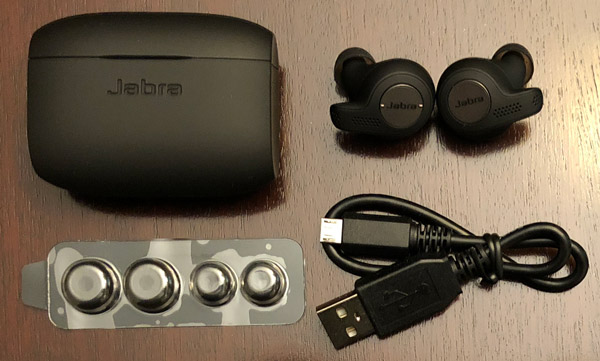
The Elite Active 65t true wireless earbuds are a twin of the standard Elite 65t’s but have been engineered to withstand greater exposure to moisture and thus are more hardened against sweat and the great outdoors. Both Elite 65t’s are Jabra’s second generation of truly wireless earbuds with improved sound quality, a better, more secure fit, and Bluetooth 5.0 connectivity. These lightweight earbuds are not only comfortable with a secure fit but engineered/optimized for listening to music, videos, working out, and participating in calls.

Package Contents:

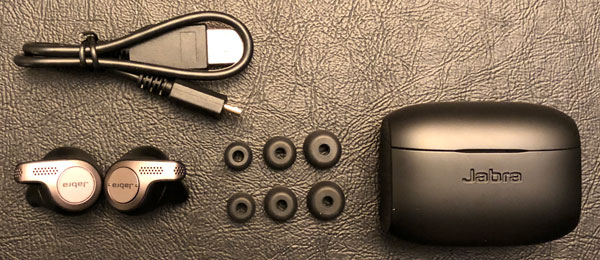
  • Jabra Elite Active 65t
  • Charging case
  • Micro USB cable
  • 3 sets of silicon EarGels
  • Quick Start

Design and features

The Elite Active 65t’s design is a departure from Jabra’s classic fin-stabilized form factor. Unlike its predecessor, the 65t’s molded shape is all that is needed to securely hold the earbuds in your ears. Inserting them into your ears is a simple quarter turn process…as easy as turning a 90-degree valve.

The exterior of the Active 65t earbuds is made of a black rubberized plastic and pewter metallic coloring with Jabra stamped in the center of both multifunction buttons. Each earbud has two microphones for better ambient noise and wind reduction, making for crisp clear calls on both sides of the conversation. The rest/majority of the Elite Active 65t earbuds are a hardened black plastic, each with a pair of metal connectors for charging in their case.

Build quality and style:

The Elite Active 65t earbuds’ material and build quality are both very good, as you would expect from a high-end and relatively expensive set of headphones. As I mentioned, the Elite Active 65t and its charging case have a rubberized/grippier finish than the standard Elite 65t giving them a slightly better grip in the ear.

The Elite 65t series earbuds (both the standard and Active) are direct competitors of Apple’s AirPods and crush them in nearly every category including secure fit, features, controls, sweat-proofing, and overall looks. I admit style is subjective, but Apple’s earbuds look like white dangly earrings from the 1980’s that could come falling out @anytime. The Elite’s secure fit, compact design, and subdued looks are much more me. Add in the fact the Active 65t’s are engineered to survive the best workout you can muster, I do not even see why ANY athlete would choose the AirPods over the Elite Actives (and I’m an Apple guy).

Charging & Storage:

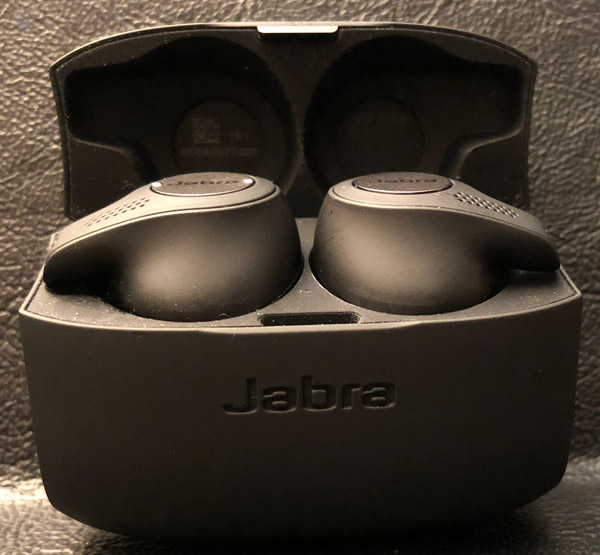
The charging case is small, black, and well made, with the shape of a small pillbox. It is meant to not only charge the Elite earbuds but store, transport, and protect them as well. The case is powered by a micro USB charging port on the base. There is an associated status LED meant to let you know when it needs to be recharged, is charging, or fully powered up.

The top third of the case opens to reveal two form-fitting spaces for the earbuds, with a LED in between that lets you know if the headphones are fully charged and ready to go. The lid has a tight and very firm seal that can be tricky or an effort to open. But with a bit of practice and use, opening the lid becomes easier as the case/mechanism wears in. When the earbuds are in the case, LEDs on their exterior momentarily pulse, depending on how charged they are (green) or that they’ve made contact with the charging points as you store/charge them (red).

Jabra promises 5 hours of use before needing to recharge. The storage case has an internal battery with two additional charges before the earbuds + case needs to be plugged back in. If your earbuds run out of power and you want to use them on the fly, a quick 10-15 minute charge gives an hour plus of listening, long enough for most runs, commutes, phone calls, even most shows and videos.

The earbuds themselves are relatively lightweight and so comfortable, you barely know they’re there. The right bud has a single multipurpose button for call answering, pausing/playing music, and pinging your smart-devices’ digital assistance (longer press) and the left is a rocker button with two small tabs for managing volume and track skip/repeat (longer press).

Fit and Comfort:

Jabra includes three sets/sizes of silicon EarGels meant to help find an ideal, custom fit. With the right fit, the Elite Active 65t earbuds are very comfortable to wear producing excellent sound. Jabra’s new wingless design works extremely well, providing a secure fit second to none. Once inserted into my ears, I rarely had to adjust them for comfort or better sound. Even when pressing either multifunction buttons (aka adjusting volume or answering a call), the Elite Active 65t’s remain securely in place.

The easiest way to get them properly situated/inserted is to position each earbud with the arm facing straight down, and then twisting backward. The arms should point toward your face with a slight downward angle, as pictured above.

Sound Quality:

As with most/all earbuds, the better the earplug-type of fit you can get, the better the sound quality and passive sound isolation. Overall the sound experience was excellent on all fronts: music, video, calls, and video chat. Bottom line: the Elite 65t series are the best sounding earbuds I have ever used or tried.

The Major Difference:

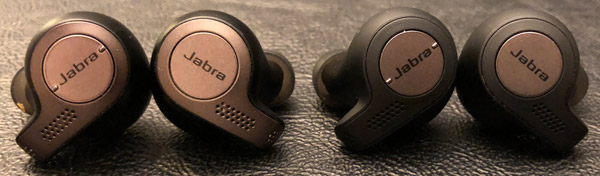
Other than finish and coloring, the only significant differences between the Elite Active 65t (right) and standard Elite 65t (left) models come in terms of workout performance/data tracking and survivability. The Elite Actives have a built-in motion sensor for tracking workout activity that is viewable/available on the Jabra+ app. But as I have mentioned, the real enhancement from the standard Elite 65t is their IP56 rating, which means they can survive high-pressure water jets and limited dust exposure. Theoretically, no matter how insane your workout is, they should live to fight another day. The Elite Active 65t’s are backed by a one year warranty on parts and workmanship and two years against failure due to dust, sweat, and weather. And for those of you that need your earbuds even more hardened, the Jabra Elite Sports earbuds that are still available, have a IPan7 survivability rating, and include a three year warranty against failing due to sweat or moisture. FYI: mine are still going strong…

I have been using the Elite Active 65t’s daily for about a month now, doing my best to put them through their paces. I used them during my daily commute, running stairs, elliptical machine, a dozen runs, walking around, on a inversion board, etc…definitely many sweaty moments and occasionally upside-down.  They have stayed securely in my ears, sounded great, and have not shown one sign of dying or being impacted whatsoever.

What I like

  • Solid, secure, comfortable fit
  • Excellent sound quality
  • Great call quality
  • Solid passive noise isolation
  • 5 hr battery life (15 w/case)
  • Zero video lag
  • One year warranty on parts and workmanship and two years against failure due to dust, sweat, and weather

What needs to be improved

  • None

Final thoughts

The Elite Active 65t’s have become my new goto headphones overall. Their comfort, secure fit, sound quality, IP56 water resistance, and overall design are excellent and really the truly wireless earbuds to beat. Their in-the-case charging, form factor, and portability are ideal for athletes on the go. I carry the Jabra Actives Elite 65t earbuds with me everywhere I go for listening to music on the bus ride into work, walking around town, video on the elliptical machine, running stairs @lunch, or pounding the pavement in the rain…they are up for the task. I love the fact they fit so well, rarely needing to be adjusted, and have no cords dangling definitely add to the Zen of running.

Price: $189.99
Where to buy: The Elite 65t’s are available from Jabra or Amazon.
Source: The sample of this product was provided by Jabra.

Filed in categories: Reviews

Tagged:

Jabra Elite Active 65t true wireless earbuds review originally appeared on The Gadgeteer on July 25, 2018 at 11:00 am.

Note: If you are subscribed to this feed through FeedBurner, please switch to our native feed URL http://the-gadgeteer.com/feed/ in order to ensure continuous delivery.
Use your laptop anywhere with the Foldable Laptop Stand by Levit8

NEWS – How many times have you found yourself in a place where you need to or want to use your laptop, but there is either no place to sit and use it at a comfortable height or no place clean and comfortable to use it while standing? I have faced this scenario more than once, and I have frequently looked for a portable stand that has the height and weight requirements that will also allow me to carry it without an issue.

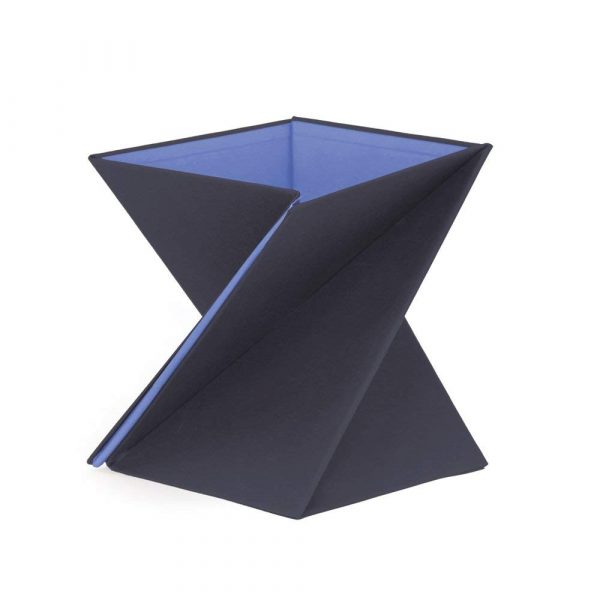
I recently came across the Foldable Laptop Stand by Levit8. This foldable laptop stand seems like it would work in a variety of scenarios. It is an origami style design that is lightweight and claims to be able to support 20 times its weight. It is constructed from polyester, PU fabric, and high-density cardboard, and is stain and water-resistant. It comes in the following 4 sizes: Small: 9″ x 9″ x 9″ (1.3lbs); Medium 9″ x 9″ x 11.9″ (1.65lbs); Large: 9″ x 9″ x 14″ (1.85lbs); X-Large: 9″ x 9″ x 16.2″ (2lbs). Since the largest size weighs only 2lbs, it would likely be an easy addition to my EDC backpack.

If you are interested in purchasing the Foldable Laptop Stand by Levit8, you can head over to Amazon and pick one up. They range in price from $23.95 to $34.95 depending on the size you choose.

Filed in categories: News

Tagged:

Use your laptop anywhere with the Foldable Laptop Stand by Levit8 originally appeared on The Gadgeteer on July 25, 2018 at 10:00 am.

Note: If you are subscribed to this feed through FeedBurner, please switch to our native feed URL http://the-gadgeteer.com/feed/ in order to ensure continuous delivery.

TRENDnet Powerline 200 AV PoE+ Adapter review

REVIEW – The TRENDnet Powerline 200 AV PoE+ Adapter extends a computer network almost to 1000 ft by transmitting an encrypted signal over existing electrical wiring. The adapter can also power PoE+ devices. Best of all it is ready to use out of the box. Read on to see what I think!

What is it?

The TRENDnet Powerline 200 AV PoE+ Adapter creates a high-speed computer network on top of  your home’s existing electrical wiring. It does this by creating an encrypted radio signal within home wiring for transmitting and receiving network traffic. This is useful for using network components that require wired network connections in rooms where no such connection is available. The TRENDnet Powerline 200 AV PoE+ Adapter also has PoE+ capability, which means that it can supply up to 30W of power over the ethernet connection for powering devices. Some devices which may benefit from this include IP cameras, wireless access points and VoIP handsets. 

What’s in the box?

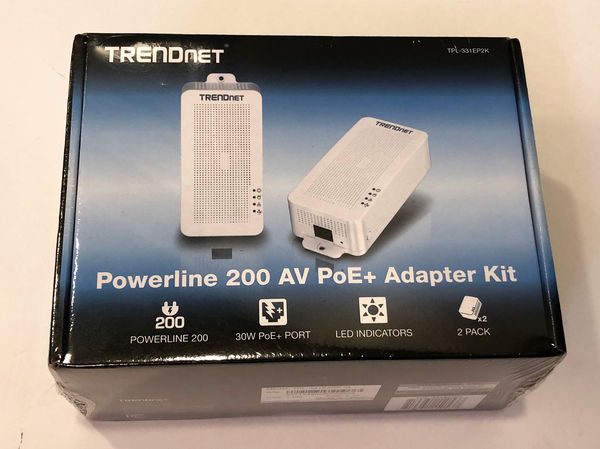
The product review is for the TPL-331EP2K which contains two units for starting a network.

  • 2 x TPL-331EP
  • Quick Installation Guide
  • Safety note (about the dangers of using damaged electrical equipment and exposing the unit to extreme heat)
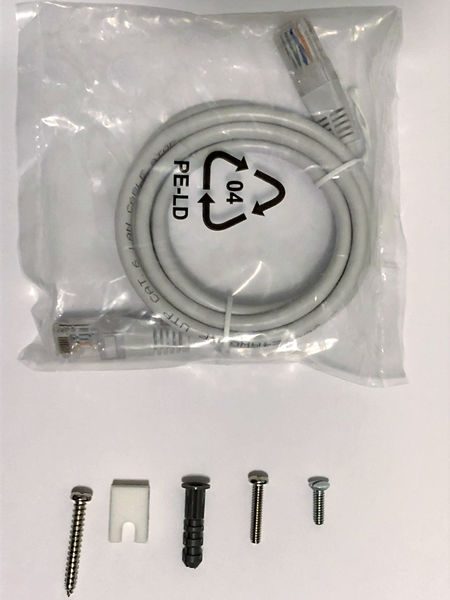
  • 2 x Network cable (1.2m/4 ft.)
  • 2 x mounting hardware

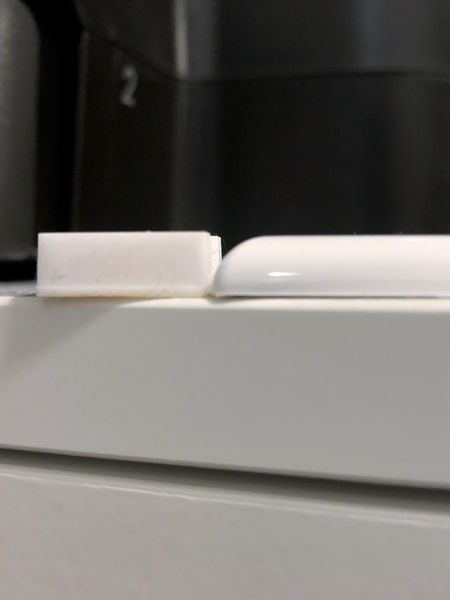
Mounting hardware includes a plastic drywall anchor, screw and foam spacer so that the base of the unit can be fastened to the drywall below the wall receptacle. You can see from the picture below that the spacer, on the left, is about the same thickness as the wall plate (on the right).

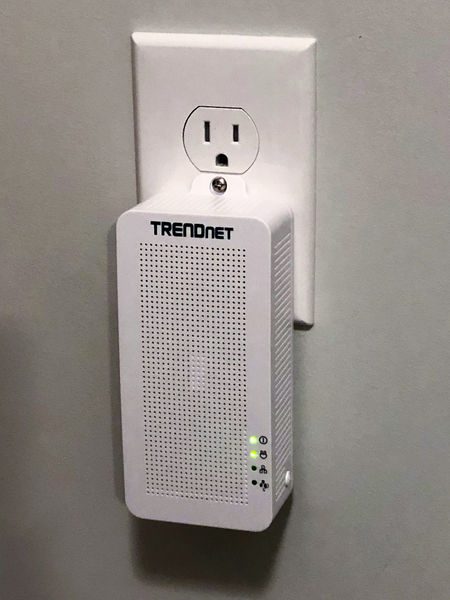
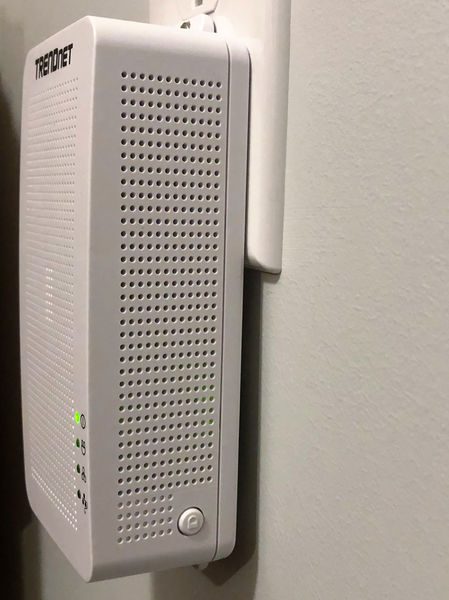
The mounting hardware also comes with an extended wall plate screw that can support the weight of the adapter in a standard duplex receptacle design. The unit weighs 7 1/4 ounces so it will generally stay installed without the screw – the hardware provides assurance that it will not be removed accidently. The picture below shows the unit fastened by the wall plate screw only. 

Design and features

Specifications

Standards  • IEEE 802.3, IEEE 802.3u,  IEEE 802.3x,  IEEE 802.3af,  IEEE 802.3at,  IEEE 1901
Frequency Band • 2 – 28MHz
Modulation/Protocol • OFDM, 1024/256/64/16/8-QAM, QPSK, BPSK, ROBO; CSMA/CA, CSMA
Data PHY Rate • Up to 200Mbps
Networking Distance • Powerline: Up to 300m (980ft.) linear distance over electrical power lines***
Encryption • 128-Bit AES (Advanced Encryption Standard)
Powerline Nodes • Up to 8 (max.)
Overlapping Powerline Networks • Up to 4 (per electrical system)
Special Features • Auto-connects to other TRENDnet Powerline adapters;  IPv6 support;  IGMP / MLDv2 Streams
Power • Input: 100 – 240V AC, 50-60Hz; Consumption: Active mode: 2.3W (max.); Standby mode: 1.7W (max.); PoE Budget: 30 Watts (max.)
PoE Delivery • Pin 1, 2 for power+ and pin 3, 6 for power- (mode A)
Operating Temperature • 0 – 55°C (32 – 131°F)
Operating Humidity • Max. 93 % non-condensing
Certifications • FCC;  IC
Dimensions • 156 x 67 x 43 mm (6.14 x 2.6 x 1.7 in.)
Weight • 205g (7.2 oz.)
Warranty: • 3 year

TRENDnet Powerline 200 AV PoE+ Adapter Design

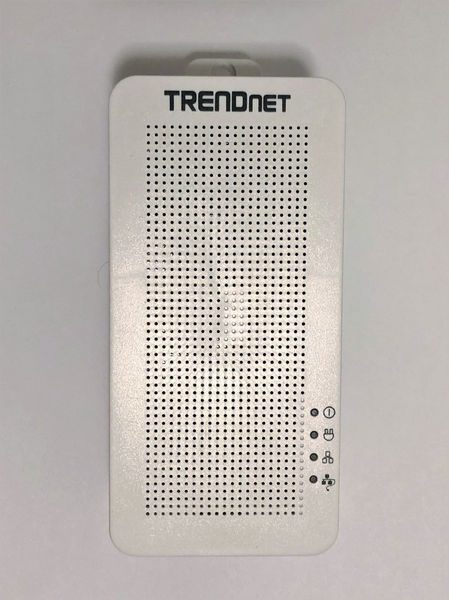
The power adapter will look at home in any fairly technical setting, such as an AV area or near a computer workstation area. However, it’s technical design and lines will be somewhat of an eyesore anywhere else. For instance, if you are using this to discreetly power an IP camera then the large TRENDnet box will certainly provide a hint that there may be surveillance in the area.  The front of the unit is well ventilated but it seems excessive for a device that only consumes 2.3 W.

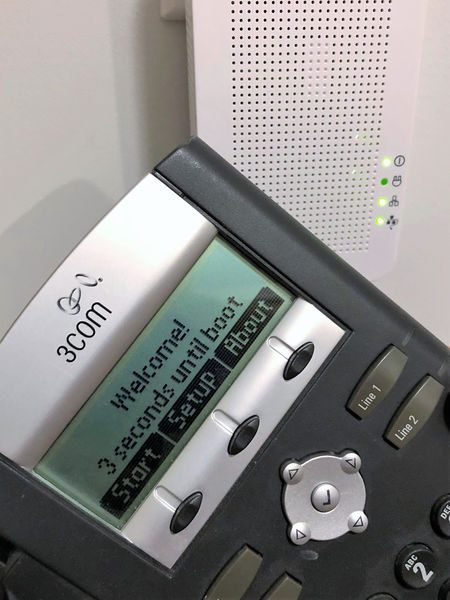
The four LEDs on the front indicate the operating state of the unit. The top LED is always lit whenever the device is powered. The second from top LED is lit when the powerline network is connected and blinks when data is transmitted over the powerline network. The second from bottom is lit when the Ethernet port is connected and blinks when data is transmitting over Ethernet. Therefore, the middle two LEDs always blink together, but the second from the top may blink on its own (indicating the powerline network overhead). The bottom LED is lit when a PoE/PoE+ device is connected.

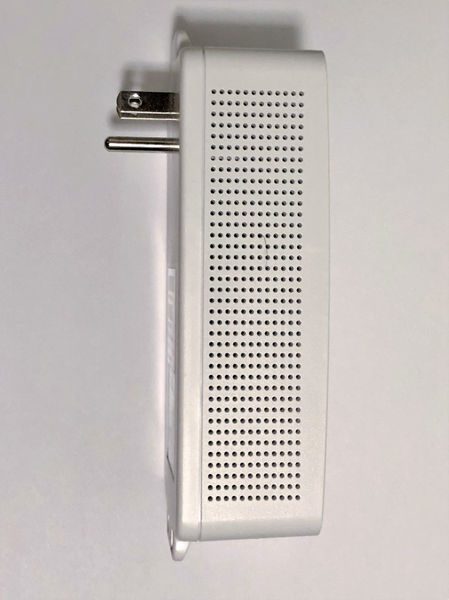
The left side of the unit has more ubiquitous venting but no other interface or indicators.

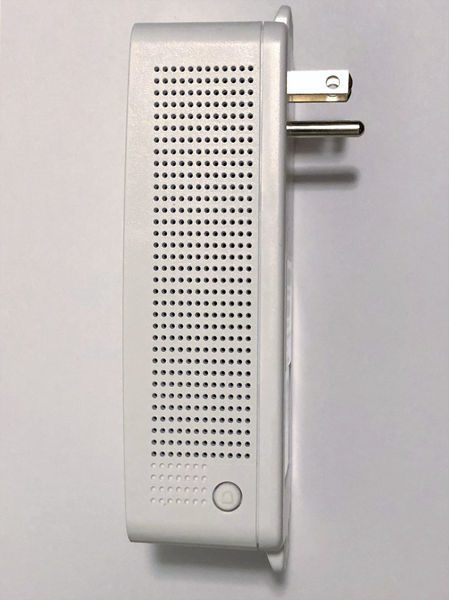
The right side of the unit looks similar to the left side but there is a sync button at the base. Pressing the sync button for 3 seconds initiates a synchronization session. The powerLED will begin to blink for 2 minutes. Pressing the Sync button on additional adapters within the time frame will synchronize encryption keys between these adapters and create a private network. Without performing this step any additional TRENDnet adapters introduced into the electrical circuit will also be allowed to join the network. Performing this step on a subset of adapters (if four or more adapters are connected) will create an isolated network of adapters.

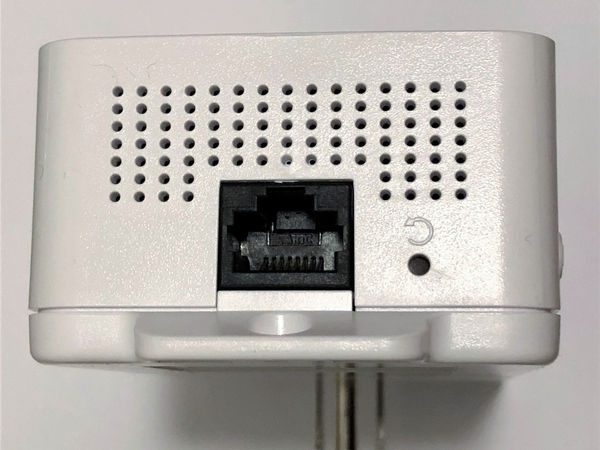
The bottom of the device is shown in the picture below. The Ethernet port is a standard design. The reset button to the right restores factory defaults settings if it is pressed for more than 10 seconds. When resetting  all LEDs will turn off and on again. After reset the powerline network name will return to the default “HomePlug AV”.

Operation

Operation is the definition of simplicity. The adapters automatically establish a network out of the box. The adapters are also cross-compatible with Powerline 1200, 600, and 500 adapters.

The powerline communication works on a single electrical system. (Usually controlled by a single distribution panel). Power strip, GFCI outlets, and AFCI circuit breakers may degrade Powerline network signals. My first choice for outlets in my home was on two different end-runs powered by different breakers. One breaker is the standard design from 1973. The other breaker is a GFCI type installed last year. The Powerline signal did not transmit across the GFCI. However, it was easy to debug this situation by observing the LEDs on the front.

I tested the operation of the PoE with a VOIP phone from work and it successfully powered up. You can see the PoE LED illuminated in the picture below, and the Powerline LED in the middle of a blink. I didn’t have any PoE+ devices at my disposal.

Performance

Aside from the PoE capability, the most important aspect of the system is how quickly it can provide communications over the electrical system and how reliable it is. Every electrical system is a little different so these tests only indicate one set of results and can’t guarantee the maximum or minimum performance achievable in another application.

One thing I did notice is that I cannot use touch-sensitive lamps on the same line as the adapters. The adapters must introduce signal noise that triggers the circuitry to turn the touch light on and off.

To test performance, first I plugged my laptop directly into my router and then the router to the TRENDnet and the TRENDnet to another computer. I tested the speed between the systems using LAN SpeedTest Portable Ver. 4.1.0 Lite by Totusoft. The OS parameters the computer used for the test:

Operating System: Windows 10 Build 14393
Window ScaleFactor: 1
Network Cards: 1
HP Timers: 0 = 0.01 1 = 0.09 10 = 9.38 100 = 99.02
Packet Size: 1 MB to 1 MB
Packet Size Avg: 1,000,000 Bytes
Packets: 1
Write Cache: Enabled
Read Cache: Disabled

The results vary considerably from test to test. However, in general, the results using the Wi-Fi in my house (with the Ethernet ports disconnected):

Write Speed: 149.08 Mbps
Read Speed: 199.52 Mbps

The typical results using the TRENDnet without Wi-Fi:

Write Speed: 16.51 Mbps
Read Speed: 24.60 Mbps

And for comparison, the results at work (using a different source and destination):

Write Speed: 231.96 Mbps
Read Speed: 273.98 Mbps

The results above indicate that the Powerline is not operating at 200 Mbps. Unless the Powerline network is very clean there may not be sufficient bandwidth for 4k video, for instance. However, 25 Mbps is adequate for  general web surfing, email, social media, Online gaming, Video conferencing, and HD video streaming. It would be great if the TRENDnet could provide an indication of  signal quality. Maybe an LED that indicated the electrical system signal-to-noise ratio could be included in future designs.

The TRENDnet has been connected to my SmartThings hub for the past month. I have not had any reports from my hub that the internet signal has dropped. Therefore I can say that the connectivity remains very high.

What I like

  • Easy Set-up
  • PoE/PoE+ for devices that can use it

What needs to be improved

  • electrical system quality check

Final thoughts

The TRENDnet Powerline 200 AV PoE+ Adapter provides network access through electrical wires when network cabling or Wi-Fi isn’t available. Setup is easy since the adapters auto-connect to an encrypted network out of the box. Even if the signal isn’t the fastest, it seems to be very reliable.

Price: $59.99
Where to buyAmazon
Source: The sample for this review was provided by TRENDnet.

Filed in categories: Reviews

Tagged:

TRENDnet Powerline 200 AV PoE+ Adapter review originally appeared on The Gadgeteer on July 25, 2018 at 9:00 am.

Note: If you are subscribed to this feed through FeedBurner, please switch to our native feed URL http://the-gadgeteer.com/feed/ in order to ensure continuous delivery.