
To boldly listen as no-one has listened before

Over the decades, the Starship Enterprise has taken many forms, but this time she’s taken the form of a Bluetooth speaker.  This speaker is designed after the Galaxy-class Enterprise NCC-1701-D from The Next Generation.  The ship is a 12″ long scaled replica; it stands 12.5″ x 7″ tall x 9″ wide when displayed on its 2-piece stand modeled after a combadge. It connects to your mobile device or computer via Bluetooth 4.1 and has a 33ft range.

Inside is a 45mm single, full-range speaker.  It’s powered by an 800mAh lithium-ion battery, which charges with a DC 5V 1A source and included microUSB-to-USB charging cable.  You’ll get 6-8 hours of playback time at average volume on a single charge.  The ship also has LEDs on the engines, deflector dish, and saucer section; these can be turned off, if desired.

When you aren’t listening to music, the speaker can play various TNG sounds:  engine hum, torpedo blast, warp acceleration, and “incoming transmission” and”one minute to auto destruct” messages. You can use the engine hum sound as a white noise generator; it turns off automatically after one hour.

The Star Trek TNG U.S.S. Enterprise NCC-1701-D Bluetooth Speaker is officially licensed and available for $79.99 exclusively at ThinkGeek.

Filed in categories: News

Tagged: ,

To boldly listen as no-one has listened before originally appeared on The Gadgeteer on March 7, 2018 at 8:00 am.

Note: If you are subscribed to this feed through FeedBurner, please switch to our native feed URL http://the-gadgeteer.com/feed/ in order to ensure continuous delivery.

DockCase MacBook sleeve with built in USB C hub review

I love my 12″ MacBook that I bought as a refurb from Amazon a couple years ago. It’s the perfect size and the perfect weight for everyday use and especially for travel. I actually downsized from a 13″ MacBook Pro just to get a smaller and lighter machine. But downsizing also meant that I would have to sacrifice performance and expansion capabilities.

I honestly haven’t had any issues with the smaller MacBook’s performance, but expansion, on the other hand, has been a challenge at times due to the machine only having one port which is used for both charging AND peripherals.  A USB hub is pretty much a necessity with this computer if you ever want to connect something to it like an external monitor, wired keyboard, wired mouse, flash card reader, etc. USB Type-C expansion hubs are a dime a dozen, but have you ever seen a sleeve style case with a built-in hub? You will now because this is a review of the DockCase for the 12″ MacBook.

What is it?

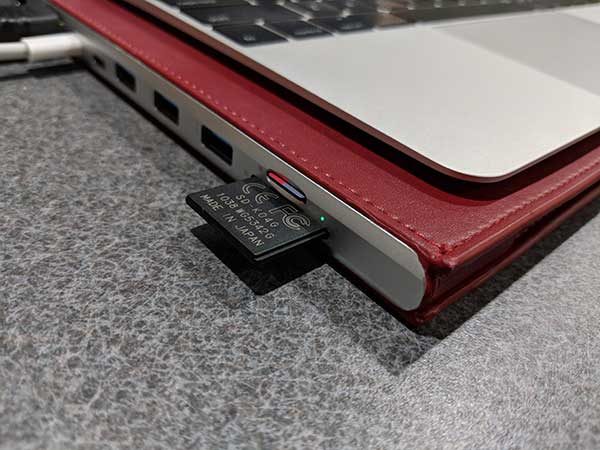
The DockCase is a slim microfiber leather and aluminum sleeve style case for 12, 13, and 15 inch Apple MacBooks that has built-in USB, USB Type-C, Ethernet, HDMI, microSD and SD card readers.

What’s in the box?

  • DockCase
  • USB Type-C to Type-C cable
  • Quick start guide

Design and features

If you didn’t look at the end of the case, you might not even realize that it’s more than a slipcover for your MacBook. Depending on the size of your MacBook, the DockCase comes in several colors like the red version that was sent to me.

On the end of the case, you’ll find the following ports:

1 LAN Ethernet(1000M Gigabit)
1 HDMI Video Output (4K@30Hz,1080P@60Hz)
1 USB C Power Delivery Charging (Up to 100W)
1 USB C 3.1 Data (Up to 5 Gbps)
3 USB 3.0 Data (Up to 5 Gbps)
Multi-in-1 Card Reader (SD-XC, SD, MMC, RS-MMC, SD-HC, Micro-SD)

A third Type-C port is on the side of the DockCase. This port is used to connect the DockCase hub to your MacBook using the included Type-C to Type-C cable.

As a case, the DockCase is just a basic sleeve that’s made of microfiber leather which is a synthetic (fake) leather with the look and feel (but not the smell) of real leather.

The interior of the DockCase has one main pocket to hold the MacBook, and a narrow pocket on the side that holds the included USB Type C to Type C cable.

The short cable is easily removed and stowed in the DockCase when it’s not being used.

My 12-inch MacBook it nicely in the 12-inch DockCase along with the cable.

Using the DockCase with my 12-inch MacBook

To use the DockCase, you connect one end of the included USB C cable into the USB C port on the MacBook and the other end of the cable goes in the USB C port on the side of the DockCase. To keep your MacBook charged you will need to connect your existing charger cable into the USB PD port on the DockCase which is located next to the HDMI port. You can see how the cables are connected by checking the image above.

I do wish that the included Type C cable was a round cable instead of a flat cable, which looks awkward routed from the MacBook to the back of the DockCase.

I tested the DockCase with my 12-inch MacBook connected to 4-year-old 29-inch ultra wide LG LED monitor. The LG monitor is not 4K, but the DockCase is able to handle 4K@30Hz or in my case, 1080P@60Hz. I couldn’t tell any difference using the DockCase’s HDMI vs. using the LandingZone docking station’s HDMI, which is what I’ve been using for the last several months.
The documentation that comes with the DockCase advises that you NOT use the USB ports to charge your phone or other devices. They are supposed to be used for data transfers only. Even so, I had to test them to see if they would actually charge my phone, a Pixel 2 XL. The 2nd Type C port next to the Type C PD port would not charge my phone at all, but the other three USB ports did seem to be charging the phone.

I tested the DockCase’s card slots which worked fine. I was able to read each one individually and transfer files between two cards. I was also able to copy files to and from USB flash drives. So, the hub does work as intended. But there is one problem and that’s heat.

The DockCase hub gets noticeably hot after several minutes of use (especially when you’re connected to an external monitor using the HDMI port). I used an IR thermometer and recorded readings of 100F to as hot as 120F. These temps weren’t hot enough to burn my skin, but the heat did make me nervous that it could become a fire hazard at some point and made me leery of leaving my MacBook connected to it while unattended. That said, the heat dissipates when the MacBook is not being used.

What I like

  • It’s a case with a built-in hub
  • Nice for the newest MacBooks that only have one USB Type-C port like my 12″ MacBook

What needs to be improved

  • The hub gets too hot
  • Not supposed to use it to charge phones or other devices
  • No room for other accessories like a charger

Final thoughts

Having a case for newer MacBooks that combines everyday protection with a USB hub is unique and useful while remaining relatively slim and sleek. If they can solve the heat issue, I think they have a winner on their hands, but as it is, I’m worried about recommending something that could be a fire hazard.

Price: $119.00 – $149.00 depending on size. $119 for the 12″ version reviewed here.
Where to buy: DockCase and Amazon
Source: The sample for this review was provided by DockCase.

Filed in categories: Reviews

Tagged: , ,

DockCase MacBook sleeve with built in USB C hub review originally appeared on The Gadgeteer on March 6, 2018 at 1:00 pm.

Note: If you are subscribed to this feed through FeedBurner, please switch to our native feed URL http://the-gadgeteer.com/feed/ in order to ensure continuous delivery.


Light up your landscape with solar-powered lights that look like flaming torches

You’ve got your indoor bulbs that look like a gas flame and a Bluetooth speaker that looks like a flaming torch, now you’re ready for outdoor lighting that also looks like flaming torches!  You’ll get a set of two Solar Garden Lights from Dikaou, plus accessories to set the lights up for wall mounting, using them as a table lamp, or for staking them into the ground for landscape lighting.

They are made of high-duty ABS plastic, and they have LED lights that mimic a flame.  You won’t have to worry about batteries because the torches are solar-powered.  The lamps will turn on automatically at night, or you can power them off when you don’t need them.  And with an IP65 rating, you know they’ll stand up to rain.

Get a set of 2 Dikaou Color Garden Lights for $69.99 at Amazon.

Filed in categories: News

Tagged:

Light up your landscape with solar-powered lights that look like flaming torches originally appeared on The Gadgeteer on March 6, 2018 at 12:00 pm.

Note: If you are subscribed to this feed through FeedBurner, please switch to our native feed URL http://the-gadgeteer.com/feed/ in order to ensure continuous delivery.

Make bath time for your dog less ruff with Aquapaw

If you’re a dog owner, one thing you probably dread is giving your furry friend a bath. Whether using the cup method in the bathtub or using the high-pressure garden hose outside it’s never an easy task and unless your dog loves water (mine does not) it’s not usually fun for them either. Aquapaw to the rescue.

Aquapaw is a wearable sprayer slash scrubber that you can turn on or off just by making a fist, giving you a free hand to better control your dog while the other does the scrubbing and rinsing. It has little rubber scrubbers that are soothing to your dog and the spraying power is more gentle than that of a typical garden hose yet more effective than a cup bath. Because you wear it on one hand like a glove Aquapaw lets you wash your dog in the same way that you would pet them. 

Included quick-release adaptors let you easily attach Aquapaw’s flexible 8′ hose to either a shower head or garden hose, so, you can bath your dog indoors or out.

The Aquapaw pet bathing tool is $24.95 and available at The Grommet.

Filed in categories: News

Tagged:

Make bath time for your dog less ruff with Aquapaw originally appeared on The Gadgeteer on March 6, 2018 at 11:00 am.

Note: If you are subscribed to this feed through FeedBurner, please switch to our native feed URL http://the-gadgeteer.com/feed/ in order to ensure continuous delivery.

Meccano Erector M.A.X. Robotic Interactive Toy with A.I. review

I have two young sons, 7 and 5, who are obsessed with building.  Legos, old sets of Lincoln Logs, boxes, whatever.  They are constantly building and creating things.  Recently my 7 year old started getting into robots so when I saw the Meccano M.A.X. robot erector set I knew it would be a hit.  I was correct.

What is it?

Well, the product name and title of this review pretty much says it all.  MAX is an artificial intelligence robot erector set.  There is a 66 step instruction guide to assemble MAX and there are a lot of parts, motors, bolts, nuts, etc. everything you would expect in an erector set.  What makes MAX different is that once assembled, it is a fully interactive toy for your kids.  Or for you if you end up not wanting to share it with the kids, or for those of you who just love building things and robots, no judgment here, this thing is pretty cool!

Hardware specs

  • 12″ tall when assembled
  • 332 parts
  • 2 hand tools
  • 1 AC/DC wall mount charger (10.4W)
  • 1 rechargeable Ni-MH 1800mAh battery
  • Recommended for kids 10+ (like I said mine are 7 and 5 so they needed my help but it was a great project for us)

What’s in the box?

332 pieces, 2 hand tools (all you need to assemble), instructions, stickers for decorating MAX and a wall charge

Design and features

The build process is like most any other erector set or similar project.  The pieces are dense plastic so I don’t worry about it breaking after a week of play like other products.  The instructions are actually very well thought out and easy to follow, which is a great thing when you are looking at a pile of 332 pieces!


Once assembled you have to download MAX’s brain software onto the brain module.  Then MAX comes to life.  Once your child (or you) brings MAX to life he starts asking you questions to learn about you.  This process takes about 10 minutes.  After that, MAX begins to learn.  It has commands that are in the instruction book that allow you to interact with him, some of which are unlocked after a period of time of interacting with it.  It has built-in infrared sensors to help it avoid obstacles when it is moving around.  You can ask MAX questions, ask it to deliver something using its gripping hands, ask it to tell you something interesting and a number of other things that my kids have just loved.

MAX is a great project to challenge young minds interested in S.T.E.M subjects and a great introduction to engineering and robotics projects.

What I like

  • Great project to work on with my kids
  • A toy that learns as you play with it
  • The sense of accomplishment my children (and I) got when MAX was built
  • Very reasonable price (on Amazon for $119.99 with a MSRP of $149.99)

What needs to be improved

I am not sure why you have to download the brain software after receiving it rather than it coming preloaded with it.  That was a little annoying but not an issue, just delayed play time a little after building it while I installed software.  Maybe Meccano is making changes to the A.I. software so when you download it you are getting the latest version, but I don’t know.

Other than that, I don’t have any complaints.  We really enjoyed the build process and the fun playing with MAX and watching it learn.

Final thoughts

As with any erector set, building it is part of if not most of the fun.  In the case of MAX, building it was a blast to work with my kids on but seeing MAX learn and its abilities grow has been really fun in the time we have had with it.  I work a lot so I am always looking for fun projects to work on with my kids so we can spend some quality time together.  When that quality time also engages their minds and imaginations and nurtures their interest in building, robotics, and science, well that’s a home run for me.

I definitely can recommend this product for kids of any age who this product fits their interest but would definitely recommend sticking with the 10+ age recommendation if they will be working on it alone.  With adult supervision, it can be fun for kids of all ages but you may have to take a lot of breaks because 332 pieces is a lot for one sitting with a 7 and 5 year old!

Price: $119.99
Where to buy: Amazon
Source: The sample of this product was provided by Meccano.

Filed in categories: Reviews

Tagged: ,

Meccano Erector M.A.X. Robotic Interactive Toy with A.I. review originally appeared on The Gadgeteer on March 6, 2018 at 10:00 am.

Note: If you are subscribed to this feed through FeedBurner, please switch to our native feed URL http://the-gadgeteer.com/feed/ in order to ensure continuous delivery.