Take pics with your DSLR without touching the shutter button

There are several types of photography that I find very enjoyable. I love close-up macro photography and also outdoor photography when I can place my camera on a tripod somewhere in nature and capture amazing photographic moments.

When I first started this type of photography, I would either have my camera handheld or next to me on a tripod, and I would depress the shutter release button to take the picture. When taking macro shots, I quickly understood that no matter how steady I tried to be, depressing the shutter release would cause some vibration on the camera and distort the full clarity of the image, because of the impact the movement had on the focus. When shooting in nature, I would try to capture insects or other natural inhabitants, but my presence next to the camera would almost always scare away the subject.

I realized that I needed a remote shutter release so that I could be away from the camera or in the case of macro photography, I could avoid the vibration of the camera.

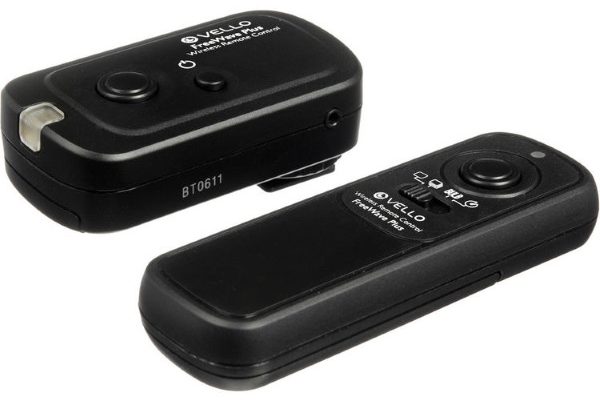
I purchased the Vello FreeWave Plus Wireless Remote Shutter release after researching the many available remote shutter devices. My decision was based on both cost and features.

The Vello Remote Shutter Release consists of 2 components, a transmitter, and a receiver. The Receiver connects to the camera via the Canon 3-pin connector and the Transmitter is the hand-held trigger that can send a signal to the Receiver from up to 100 meters away. I have never tried it from that far, but it works very well from all the distances I have tried. The Receiver and Transmitter each work on 2 AAA batteries and communicate via the 2.4Ghz frequency. In the event of any interference, they offer a selection of 16 channels to find the best signal.

If you would like to purchase the Vello FreeWave Plus Wireless Remote Shutter Release, it is available at B&H Photo Video and Amazon for select Canon, Sony, and Nikon cameras for $59.95.

The post Take pics with your DSLR without touching the shutter button appeared first on The Gadgeteer.

Filed in categories: News

Tagged:

Take pics with your DSLR without touching the shutter button originally appeared on The Gadgeteer on March 12, 2018 at 10:00 am.

Note: If you are subscribed to this feed through FeedBurner, please switch to our native feed URL http://the-gadgeteer.com/feed/ in order to ensure continuous delivery.

Add the unique beauty of natural wood to your Apple Watch with Ottm’s Hardwood bands


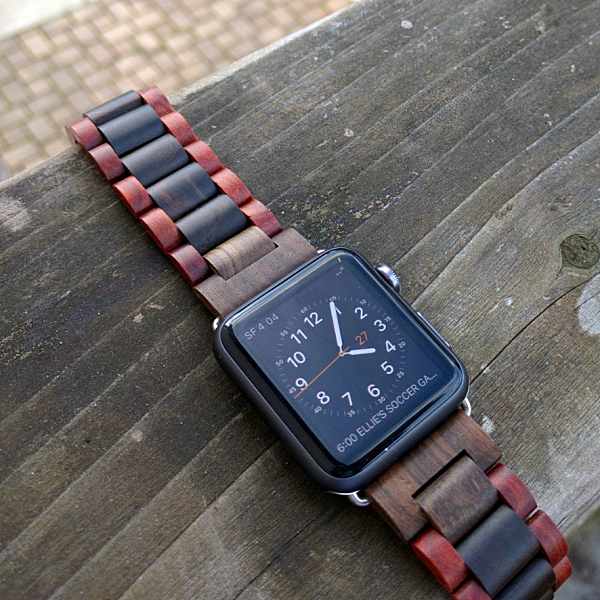
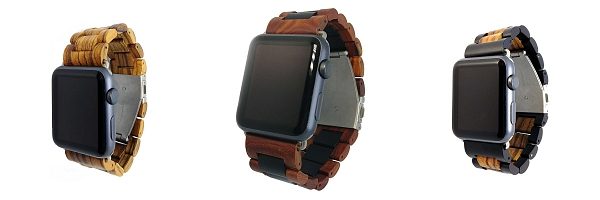
In a world full of watch bands Ottm’s hardwood Apple Watch straps really stand out. Made from two eye-catching hardwoods: Gabonese Zebrawood from West Africa best known for its striking finish and Indonesian Sandalwood which is prized for its fragrance and widely used across Asia in incense and oils. These distinctive and handsome straps have subtly rounded edges that are hand sanded to a smooth finish so that it feels comfortable on your wrist. Each band has a unique grain pattern and is hand-finished and treated with tung oil. Making them waterproof and weatherproof as well.

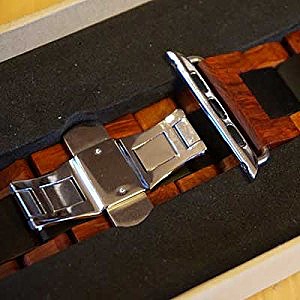
Ottm uses high-quality stainless steel for both the easy open butterfly clasp and the carefully fitted Apple Watch adaptors ensuring both durability and elegance.

The length of each band can easily be adjusted for a perfect fit using the included resizing tool. Extras include a pin removal tool, extra links and resizing instructions.

The Ottm hardwood Apple Watch band is available in both 38mm and 42mm sizes. Wood choices include Zebrawood, Sandalwood, or my favorite, a combination of the two.

The straps can be purchased at Amazon from $34.99-$49.99 depending on the size and wood finish you choose.

The post Add the unique beauty of natural wood to your Apple Watch with Ottm’s Hardwood bands appeared first on The Gadgeteer.

Filed in categories: News

Tagged:

Add the unique beauty of natural wood to your Apple Watch with Ottm’s Hardwood bands originally appeared on The Gadgeteer on March 12, 2018 at 9:00 am.

Note: If you are subscribed to this feed through FeedBurner, please switch to our native feed URL http://the-gadgeteer.com/feed/ in order to ensure continuous delivery.

Brew coffee at room temperature with the Asobu portable coffee brewer

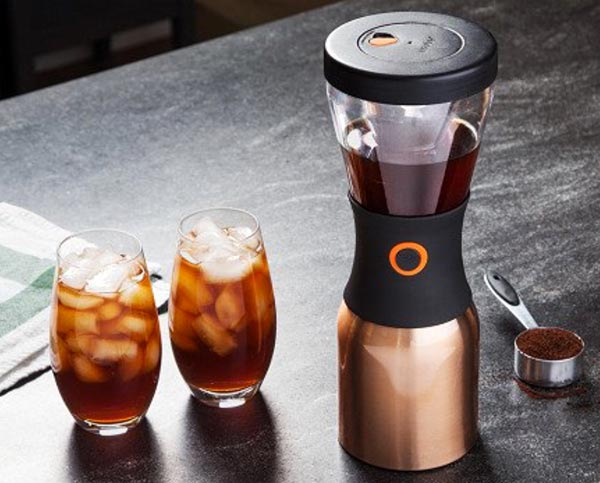
You can make fresh, cold coffee without a fancy machine with the Asobu Cold Brew Coffee Maker.  You just add some coffee grounds and 24 ounces of water into the plastic brewer and let it sit at room temperature for 12-24 hours.  When the steeping is complete, press a button to transfer the coffee into the stainless carafe, add ice cubes, and you can take iced coffee with you in the carafe.  I suppose, if you prefer hot coffee, you could omit the ice cubes and just nuke a cup of coffee as you drink it.

The carafe is a double-walled stainless bottle with copper insulation to keep the coffee fresh and cold for up to 24 hours.  It holds 32 ounces, to allow room for the addition of ice.  The brewer is made of BPA-free Tritan plastic, and it has a reusable stainless steel mesh filter.

The Asobu Portable Cold Brew Coffee Maker is available with a stainless, copper, or black carafe for $49.95 from The Grommet.

The post Brew coffee at room temperature with the Asobu portable coffee brewer appeared first on The Gadgeteer.

Filed in categories: News

Tagged:

Brew coffee at room temperature with the Asobu portable coffee brewer originally appeared on The Gadgeteer on March 12, 2018 at 8:00 am.

Note: If you are subscribed to this feed through FeedBurner, please switch to our native feed URL http://the-gadgeteer.com/feed/ in order to ensure continuous delivery.

Speak Music Muse Alexa voice assistant review

Is Alexa your BFF? Do you have the Amazon Echo or Echo Dot devices in your home? Digital voice assistants like Alexa are very handy when you want to control your smart home gadgets or when you want to ask questions and play your favorite music without using your phone, or your computer. Being able to use your voice to say “Alexa, turn up the heat” or “Alexa, play songs by U2” makes you feel like you’re living in the future. But how can we take Alexa with us on road trips in our vehicles? The Speak Music Muse Alexa voice assistant is like a miniature Amazon Echo for your car. Let’s check it out.

What is it?

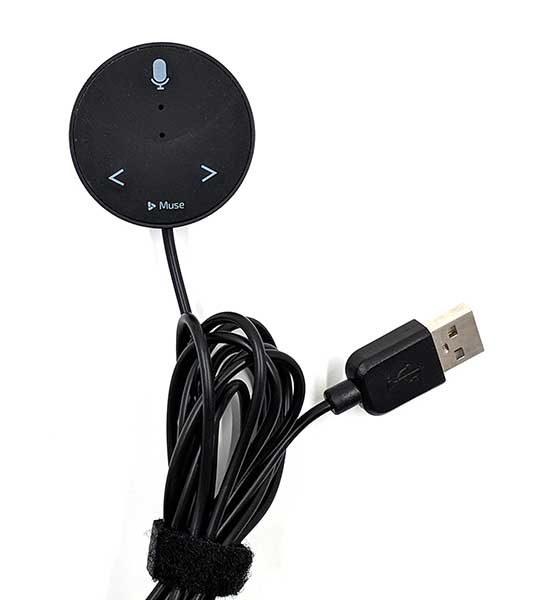
The Speak Music Muse Auto is an Alexa voice assistant with a microphone and forward and back buttons that plugs into a power socket in your car.

What’s in the box?

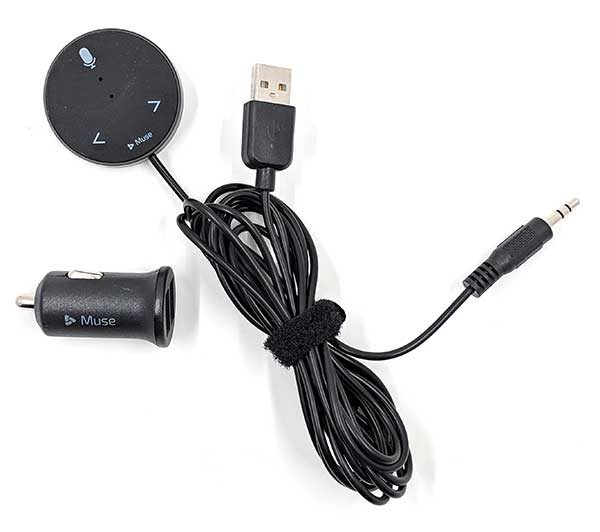
  • Muse Bluetooth device
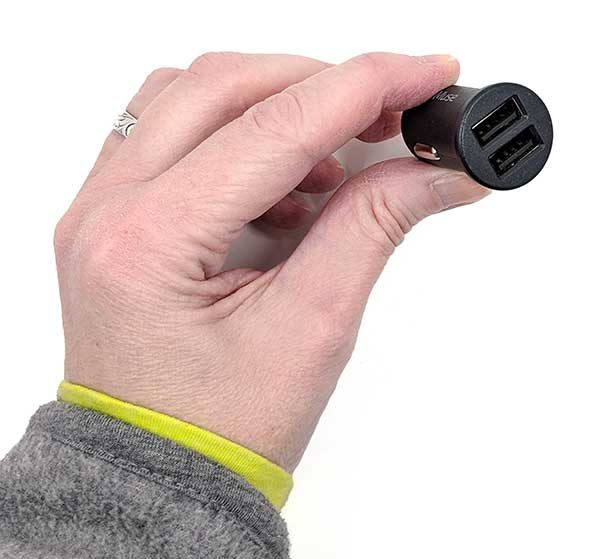
  • 12V dual USB car adapter
  • Magnetic mounting plate
  • Quick start guide

Design and features

The Muse has a black plastic puck-shaped device with a microphone, a status LED, and two buttons. Attached to it is a cable connected to it that has a 3.5mm input cable and a USB connector.

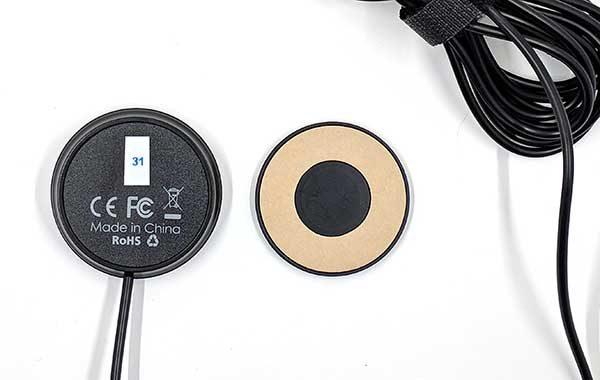
On the back of the device is a magnetic mount that can be used to affix the Muse to a flat surface on your car.

The Muse voice assistant is powered through a USB cable. If you don’t have a USB port in your car, you can use the included dual port 12V power adapter.

Setup and usage

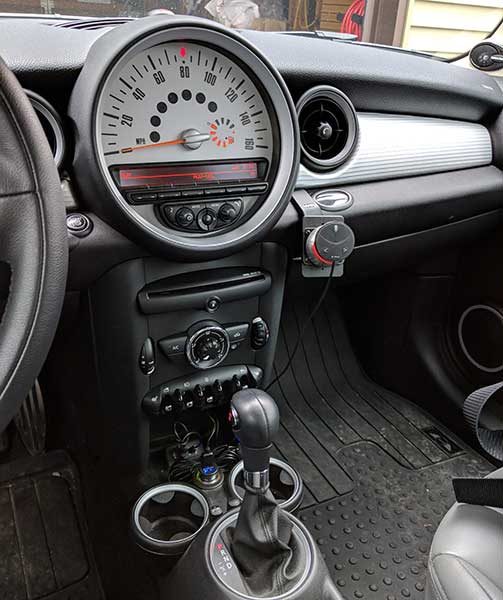
Installing and setting up the Muse is pretty easy. First, you need to find a place in your car to attach it. I didn’t have a good place to stick the adhesive mounting disk in my MINI Cooper, so I just stuck it to the iOMount that I already had installed in my car.

The next step is to install the Muse app on your phone. This is needed because your phone will be doing all the heavy lifting as far getting the info when you ask Alexa questions or command it to control other devices in your home when you’re on the road.


For the most part, you won’t even look at the app once it’s installed and you’ve set up Muse in your car. It will ask you to either connect the Muse via Bluetooth to your car, or you can use the 3.5mm cable to connect it to the Aux In jack in your car if you have one. From there, all you need to do is start talking to Alexa which you do exactly like you do with an Amazon Echo or Echo Dot, by saying “Alexa” and then your command or question. You will need to wait for a tone before saying your command or tone.

It should also be obvious that you’ll need to have a good signal on your phone in order to have a connection to the internet when you’re driving.

During my week or so of testing the Muse, I did all the usual things I would do with Alexa at home, I would ask her to read me the news, tell me what time it was, ask her where the nearest gas station was, play my favorite tunes, turn up the heat in my house, etc. All that worked as I had expected it to work.

I did run into a few small issues though. If I had my favorite music cranked up, and wanted to play another song or give Alexa another command, she sometimes would not be able to hear me unless I yelled her name a couple of times. However, the physical buttons on the Muse device are handy for skipping tracks when you don’t feel like shouting.

I also was disappointed that there was no way to get turn by turn directions to a destination. You can ask where the nearest store is and Alexa will give you the address, but she won’t tell you how to get there. She also won’t let you call people in your contacts. But, she will pause music or other playback if calls come in and then resume after the call ends.

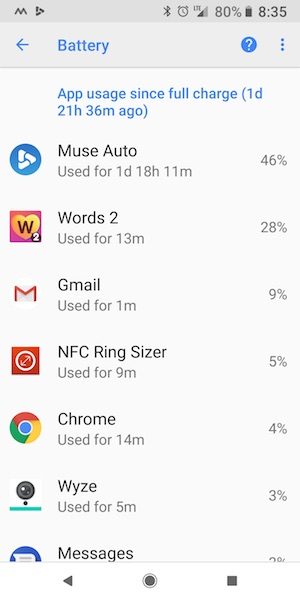
One other issue that I noticed is that the Muse app is always running in the background which can be a drain on your battery.

I did all my testing with my Pixel 2 XL and noticed a drop in my battery life after starting to use Muse which you can see above in the Android battery details.

What I like

  • Can play and control music with your voice instead of your hands
  • Works just like the Amazon Echo in your home

What needs to be improved

  • No turn by turn navigation
  • Can’t use it to call your contacts
  • Have to yell ALEXA! To get “her” attention if music is playing

Final thoughts

I like a totally hands-free way of interacting with music when I’m driving and being able to hear news briefs instead of waiting to hear them on my normal radio stations. Muse is a fun and easy way to have an invisible assistant do your bidding and I’m looking forward to when it can do even more than it can do now.

Price: $69.99
Where to buy: Amazon
Source: The sample for this review was provided by Muse.

The post Speak Music Muse Alexa voice assistant review appeared first on The Gadgeteer.

Filed in categories: Reviews

Tagged: ,

Speak Music Muse Alexa voice assistant review originally appeared on The Gadgeteer on March 11, 2018 at 3:10 pm.

Note: If you are subscribed to this feed through FeedBurner, please switch to our native feed URL http://the-gadgeteer.com/feed/ in order to ensure continuous delivery.

Waterfield Atlas Executive Athletic Holdall review

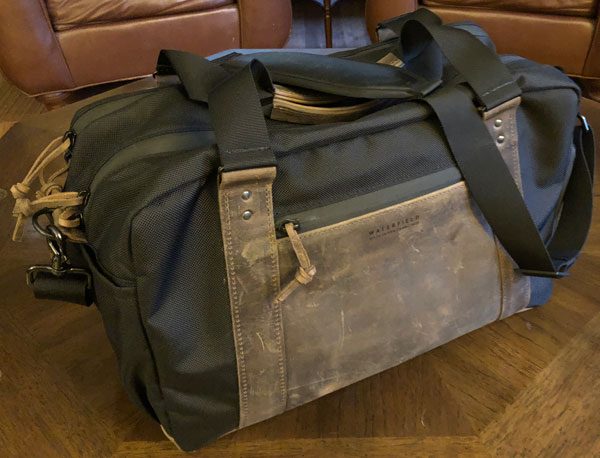
When I first learned of Waterfield’s recently released Atlas Executive Athletic Holdall, my first and only thought was…that bag is so me. I do my best to workout as often as I can, especially those days I’m in the office. Making lunch a mandatory exercise time not only makes me healthier but is an excellent break in my hectic day to refocus and destress. The Atlas is designed to (stylishly) enable the tech carrying, modern day fitness folks of the world the ability to transport everything they need in a single EDC bag from their laptop to their gym shoes. So let’s see if Waterfield Design hits the mark with their new Atlas Executive Athletic Holdall.

Typically I carry all my needed stuff into the office in a number of different bags: Colonel Littleton Navigator bag as my EDC tech bag, old nylon Air Force helmet bag for my workout gear, and reused plastic bags for lunch. Occasionally I even have to carry additional bags/containers if the office is having an event, definitely adding up to a very cumbersome commute. Being able to smartly consolidate all my cr@p into a single bag is definitely advantageous and desirable.
What is it?

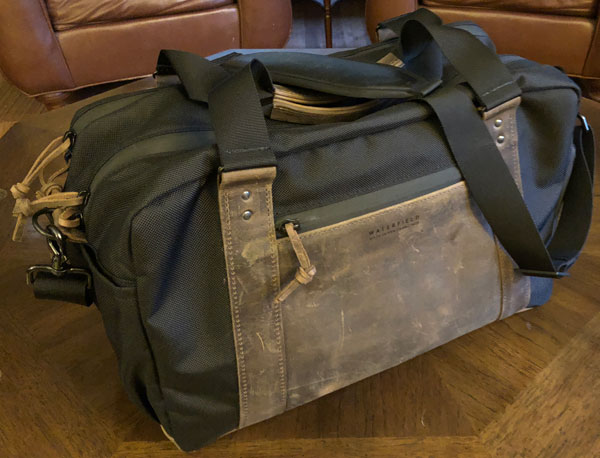
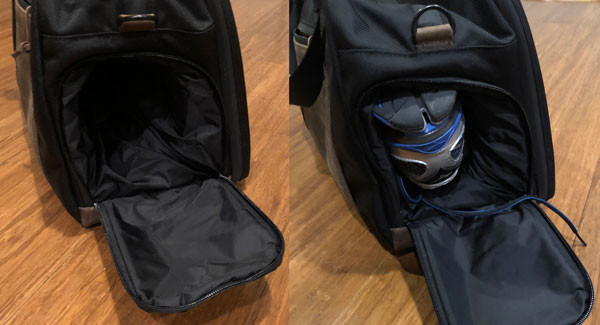
The Atlas Executive Athletic Holdall is a combination briefcase, EDC/gear bag, and athletic duffle all in one, that transitions seamlessly from office to gym and back. The Atlas has a padded tech/laptop compartment for all your EDC gear, a separate space to hold clothes, and a collapsible, zippered area to store your shoes.
Design and features

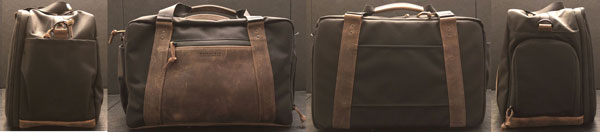
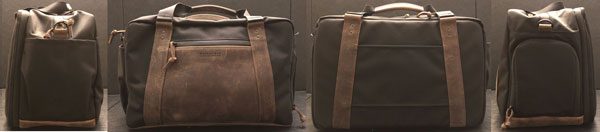
The Atlas Executive Athletic Holdall is available in one size (16″ (L) x 10″ (H) x 8.5″ (W)) that is divided into two compartments: the Briefcase and the Athletic Workout sections. The bag is made in the USA from ballistic nylon (or waxed canvas), reenforced and trimmed in full grain leather.
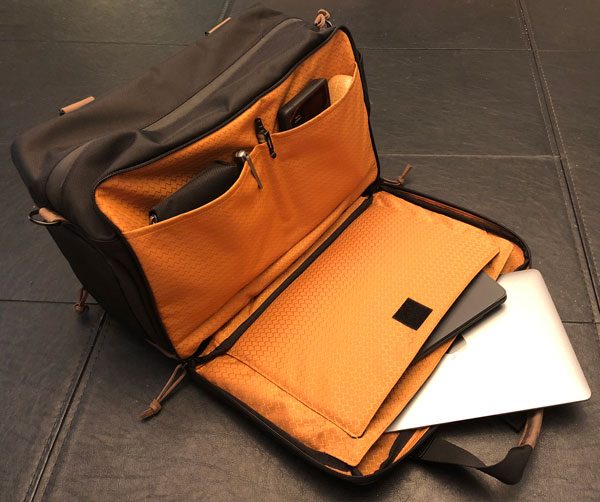
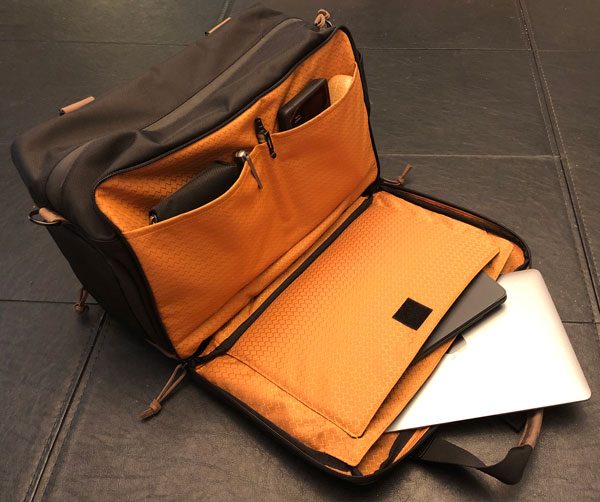
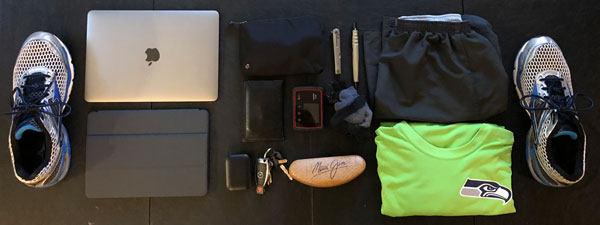
The Briefcase section opens fully enabling the front face of the Holdall to lay flat allowing for easy access to its four slipper pockets. The tech portion of the bag has 2 padded pockets engineered to protect a laptop and a tablet plus two additional pockets for stashing power cords, pens, and other EDC gear. There is a dedicated pen slot between the two smaller pockets. The padded laptop slipper pocket fits up to 15” laptops and the tablet slipper pocket fits up to 13” tablets. The two vertical pockets are deep and large enough to hold a decent amount of stuff. The tablet space held my 12″ MacBook very nicely. You could also transport paperwork in this compartment as well.
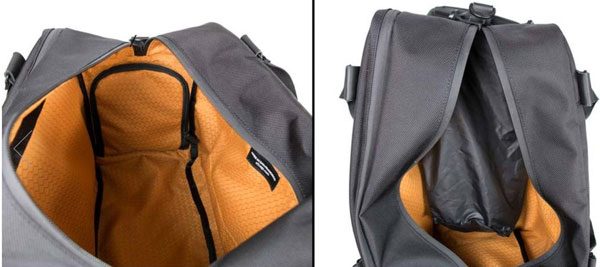
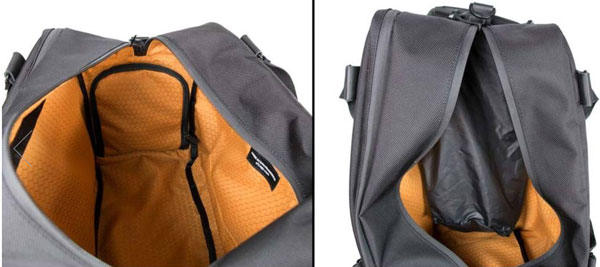
The Athletic Workout compartment can fit a fair amount of workout gear, work clothes, towel, shaving kit, etc. Both interior compartments are lined in WaterField’s smooth, finely-woven bright gold fabric.
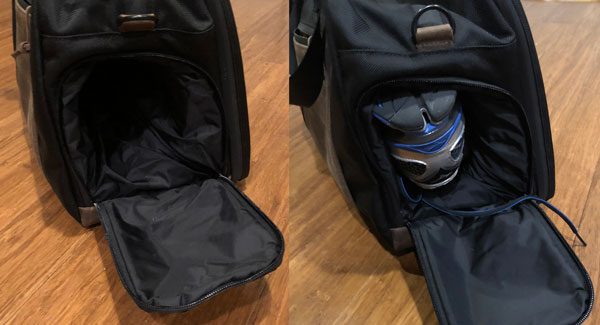
The separate, collapsible shoe pocket can hold a pair of gym shoes or work shoes…here you can see my size 13 running shoes fitting inside. This separation keeps any wetness or dirt from getting on your clothes or tech gear.

Specifications:

Materials:

  • 1050 Denier black Ballistic nylon or brown Waxed Canvas
  • Full-grain leather accents

Dimensions & Weight:

  • One size: 16″ (L) x 10″ (H) x 8.5″ (W)
  • Ballistic 3.1 lbs. / Waxed Canvas 3.4 lbs.

It can transport a lot of gear…
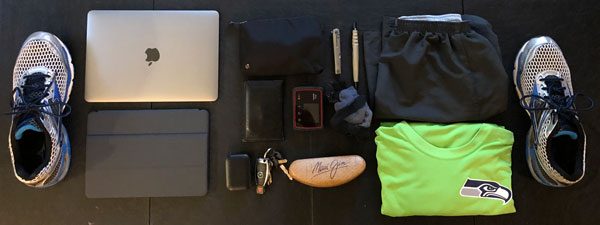
Even with all this gear, the Waterfield Altas Holdall can still accommodate my lunch & snacks.

Build and material quality:
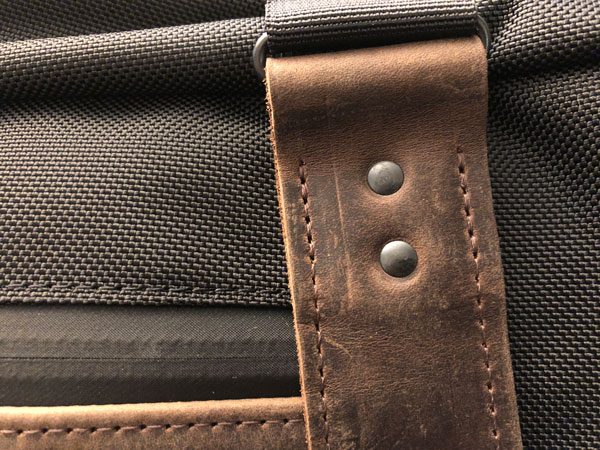
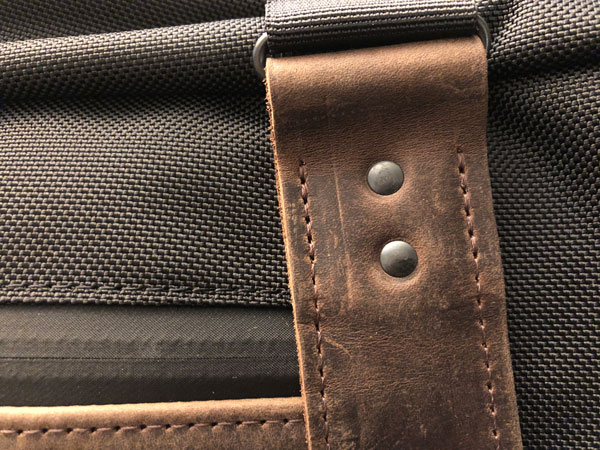
The ballistic nylon, full grain leather, zippers, rivets, and stitching are all very well done and “built to last”. In addition to strength, the leather adds a nice look and style to the bag. All of the zippers are low profile, covered, and waterproof. The entire bag holds up to liquids very well, (as the story goes…) I accidentally spilled my coffee all over the bag and it cleaned up like new with a damp rag.
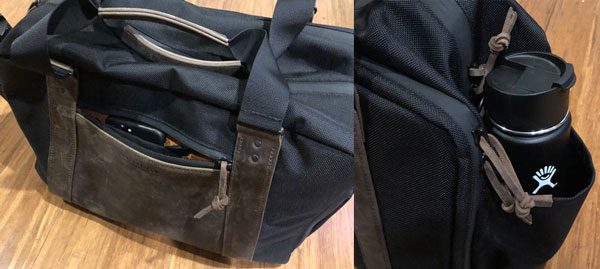
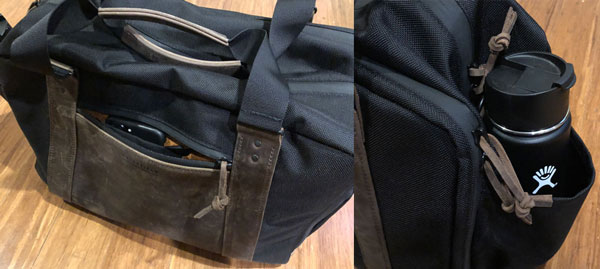
The main face of the Altas has a quick-access, zippered pocket engineered to hold smartphone, keys, business & misc cards, wallet, pocketknife, pens, etc. The inside of this exterior pocket has a dedicated, lined smartphone pocket and key fob for easy retrieval of your cell and/or keys.

The open-topped, end pocket can transport a large water bottle for convenient access.
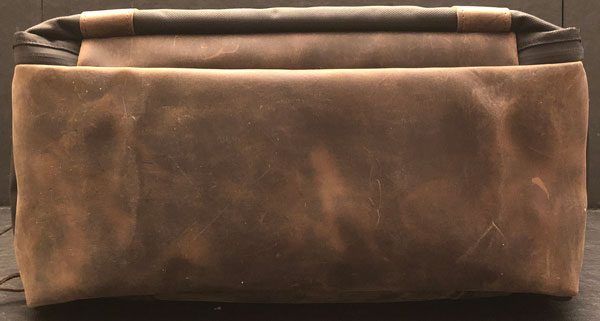
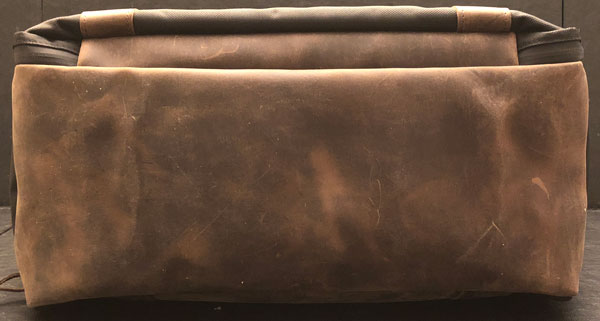
The bottom of the Altas Holdall is completely covered in leather for greater resistance to wear and tear.
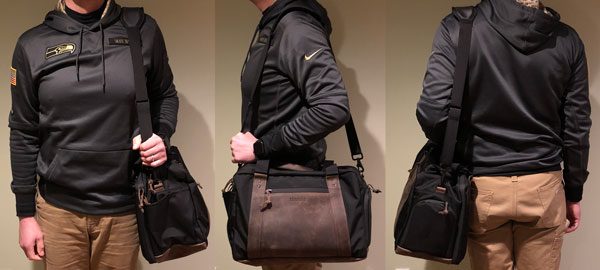
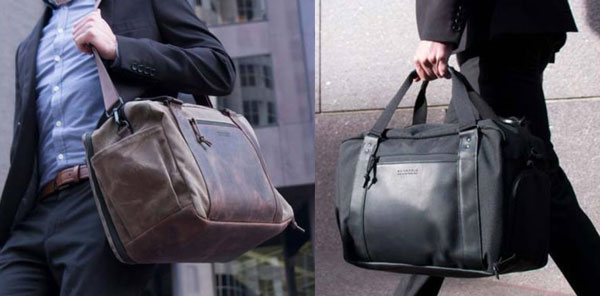
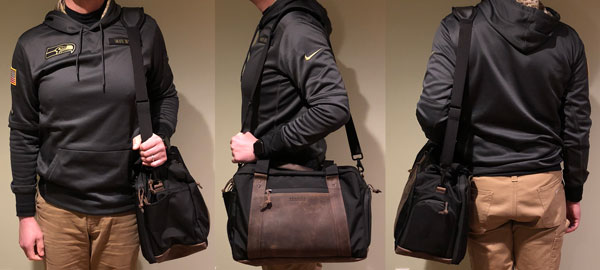
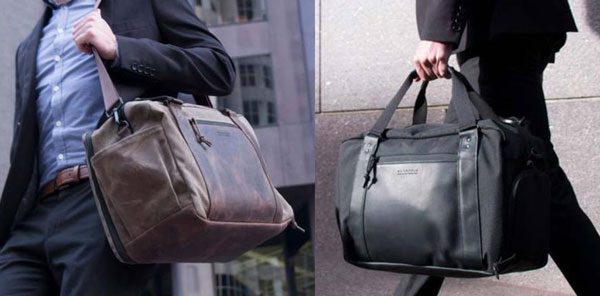
The Atlas Executive Athletic Holdall can be transported in several ways. Waterfield includes a removable suspension strap for carrying the bag over the shoulder or crossbody. The bag rides very comfortably over the shoulder, hanging at hip height.
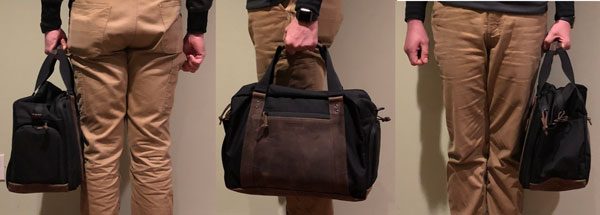
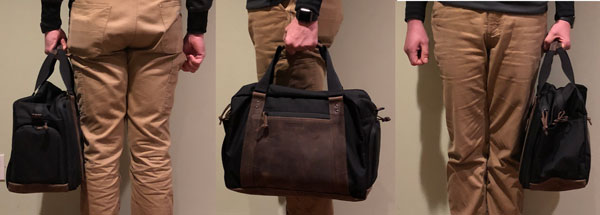
The reenforced, built-in handle carries comfortably as well. The handle is wrapped in the same full grain leather as the rest of the Holdall, for a solid grip and greater durability. With all my gear, the Athletic Holdall is not all that heavy, especially considering it is approximately three pounds lighter than my all-leather Colonel Littleton Navigator & old helmet bag combo.
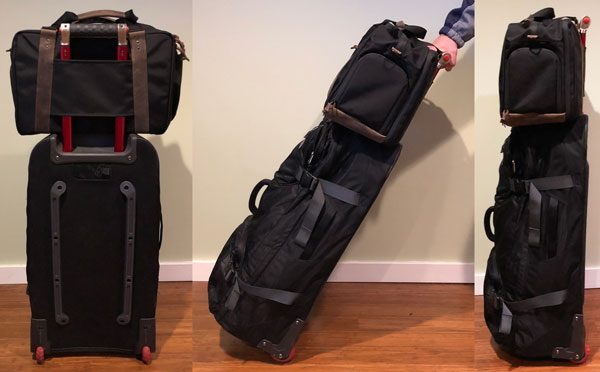
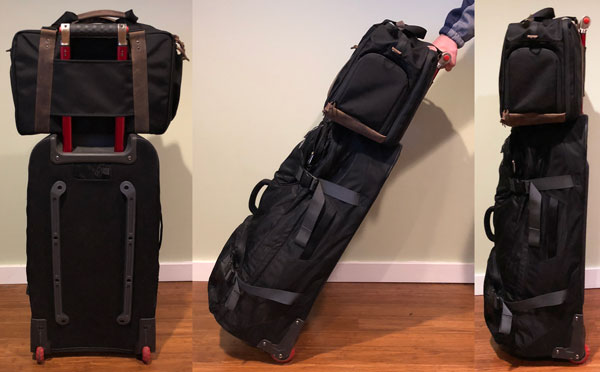
The back of the Altas has a pass-through slot for slipping onto wheeled suitcase handles.

Positives

  • Excellent material quality and craftsmanship
  • Well designed/thought out
  • Stylish, professional design
  • Wheeled-suitcase handle pass-through
  • Relatively lightweight

Negatives

  • Expensive

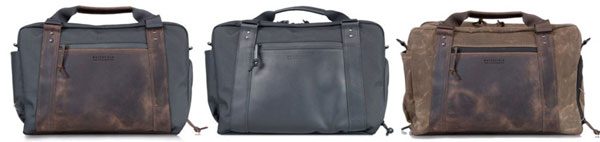
The Waterfield Atlas Executive Athletic Holdall available in:

  • black ballistic nylon with chocolate leather
  • black ballistic nylon with black leather
  • brown waxed canvas with chocolate leather

The waxed canvas variant weighs in at 3.4 lbs and ballistic nylon ones, 3.1 lbs. The Altas Holdall meets most airline personal carry-on item size requirements and makes for an excellent overnight bag on the fly.

Waterfield Designs backs all of their products with a (limited) lifetime warranty.

Final thoughts

I really like the Atlas Executive Athletic Holdall from all points of view: quality, function, and design. Waterfield has done an excellent job engineering this bag for the athletic urban warrior, creating a professional looking EDC bag for all your tech and gym gear alike. This bag functions as advertised, a single solution to replace all your other bags…doing so in polished style. While admittedly expensive, the Altas Holdall not only gets the job done, it does so with the looks for both office and Club.

Price: $429
Where to buy: Waterfield Designs.
Source: The sample of this product was provided by Waterfield Designs.

The post Waterfield Atlas Executive Athletic Holdall review appeared first on The Gadgeteer.

Filed in categories: Reviews

Tagged:

Waterfield Atlas Executive Athletic Holdall review originally appeared on The Gadgeteer on March 11, 2018 at 11:00 am.

Note: If you are subscribed to this feed through FeedBurner, please switch to our native feed URL http://the-gadgeteer.com/feed/ in order to ensure continuous delivery.