Yongnuo YN 50mm f/1.8 Lens for Canon EF is a good contender


Every photographer I know, including yours truly, has spent more money than we care to remember on lenses, all in an effort to get better pictures. When we “follow the crowd” and purchase the brand name lenses, we are usually mostly satisfied, and we just start saving for the next purchase. In many cases, our peers within our industry put a lot of emphasis on buying the “best” brand name lenses which like for example Canon’s L series lenses, are usually of incredible quality, but also incredibly priced. However, when I compare use, and relevant income, and level of photography, and the potential viewer/ customer, I often wonder why I must always shoot for the absolute best lenses when to be quite honest, many amateurs and professionals alike will never be able to tell the difference between a $600 lens and a $1000 lens, and sometimes even a $2000 lens. In my opinion, much of the success of a photo lies in the hands of the photographer’s eye and skills.

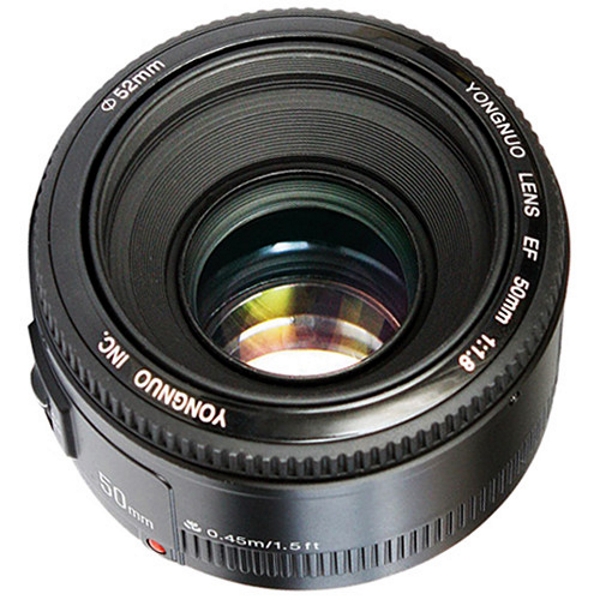
Recently, Yongnuo has raised the level of their products, and has been more noticeable with the photography gear they have been producing. Just today I was looking at the Yongnuo YN 50mm f/1.8 Lens for Canon EF, and on paper, the specifications are very comparable to the Canon EF 50mm f/1.8 STM Lens but its cost is considerably less. This prime lens has a maximum aperture of f/1.8, multi-coated glass elements, an AF/MF switch on the lens barrel and a minimal focus distance of 16 inches. It is designed to fit the Canon EF mount and works with both full-frame and APS-C sensors.

While I have not yet tried this lens, I do own the Canon version and I can’t wait for the opportunity to compare the two.

If you would like to try out the Yongnuo YN 50mm f/1.8 Lens for Canon EF you head over to Amazon or B&H Photo Video and pick one up for around $49.

Note: Yongnuo also makes this lens for the Nikon F mount.

The post Yongnuo YN 50mm f/1.8 Lens for Canon EF is a good contender appeared first on The Gadgeteer.

Filed in categories: News

Tagged: ,

Yongnuo YN 50mm f/1.8 Lens for Canon EF is a good contender originally appeared on The Gadgeteer on April 23, 2018 at 10:00 am.

Note: If you are subscribed to this feed through FeedBurner, please switch to our native feed URL http://the-gadgeteer.com/feed/ in order to ensure continuous delivery.

Geekbes USB Smart WiFi Plug review

Over the past decade, I’ve slowly been adding automation to my home, starting with X-10. Powerful new devices, like Geekbes Smart WiFi Plug, have made it easy to remotely control lamps and appliances with ease, even when outside my home.

What is it?

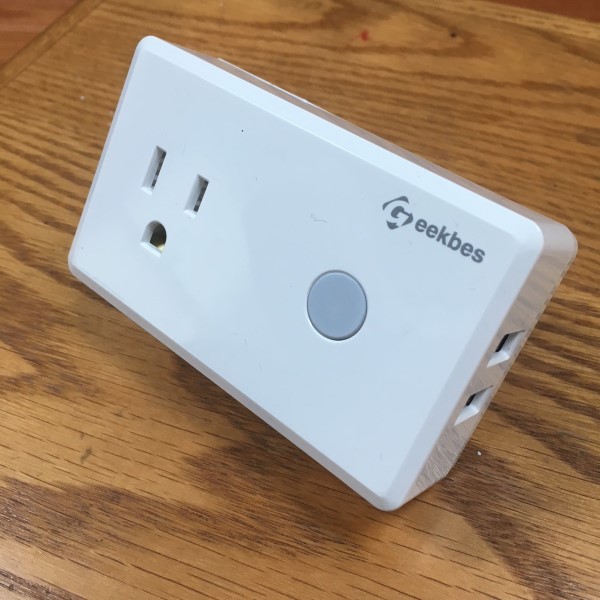
The Geekbes Smart plugs are single-socket, WiFi modules that turn on or off plug-in electrical devices using a smartphone app, Alexa or IFTTT. Additionally, each unit is equipped with a pair of USB power sockets.

Hardware Specs

  • Plastic housing
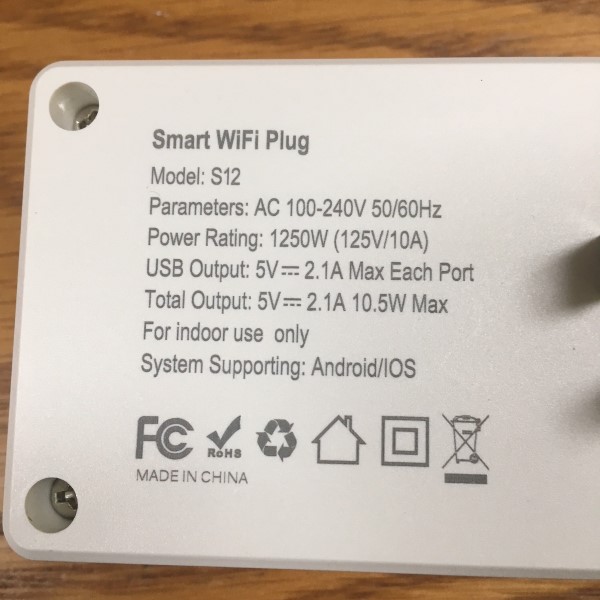
  • Dimensions: 3.75” x 2.25” x 1.2” (94.7 x 56.8 x 30mm)
  • Weight :3.8oz (107g)
  • Power Rating: 125V AC 10A
  • AC Frequency: 50/60Hz
  • Operating Temperature: -10C~+40C
  • Wi-Fi Standard: Wi-Fi 2.4GHz b/g/n
  • App Support: Android 4.1 and iOS8.0 or higher
What’s in the box?

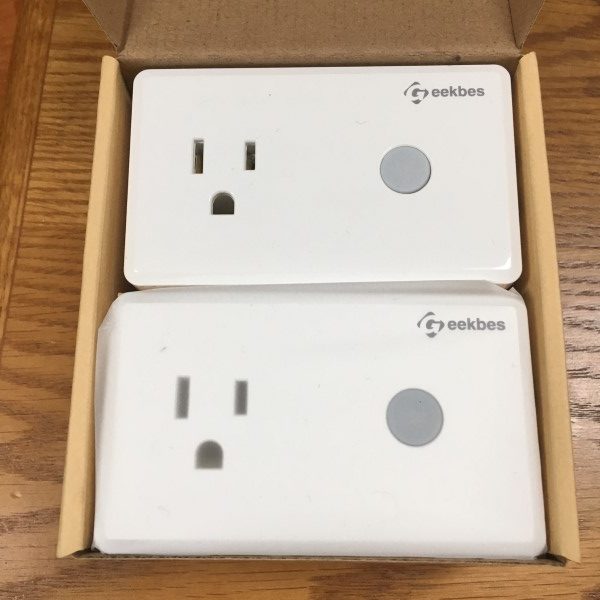
  • 2x Smart Socket
  • 1 x User Manual

Design and features

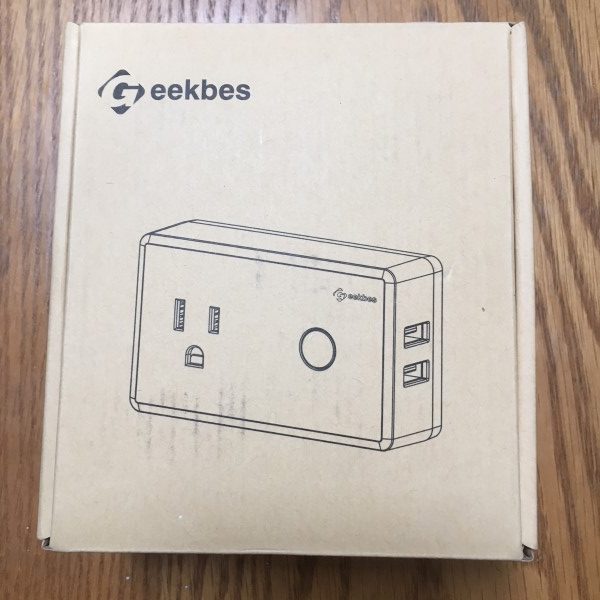
The Geekbes Smart Sockets arrived in a subdued cardboard box with black print. The instruction manual provides a QR code for downloading the app and walks through the configuration, Amazon Eco, and IFTTT integration. It’s simple and efficiently written, but be prepared to pull out your magnifying glass, the text is tiny.
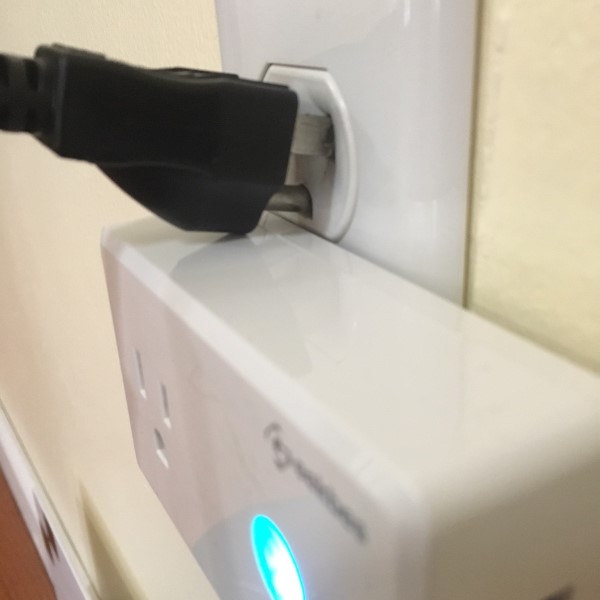
A single Geekbes plug can be used in a duplex socket. Unfortunately, only two-prong, non-grounded plugs can occupy the adjacent socket.
Connecting the sockets was a simple process: using the app, scan the QR code, wait for the device to connect, give it a name and you’re off and running. I do have one caveat – if you use a VPN, it will need to be disabled during the connection process. I could not add any devices with my VPN enabled. As soon as the devices are connected, I reconnected my VPN and had no difficulties using the app. There is an icon-based list of devices that can be controlled with the Geekbes app, a much wider variety than other home-automation apps I’ve used.
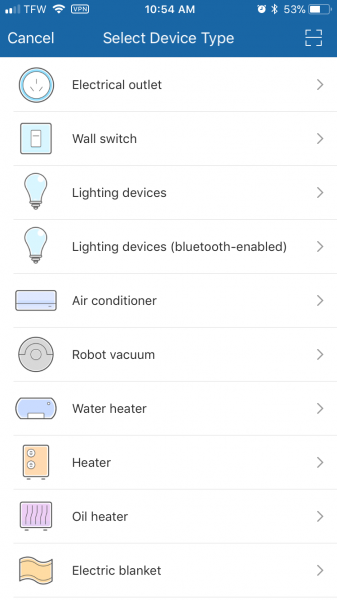
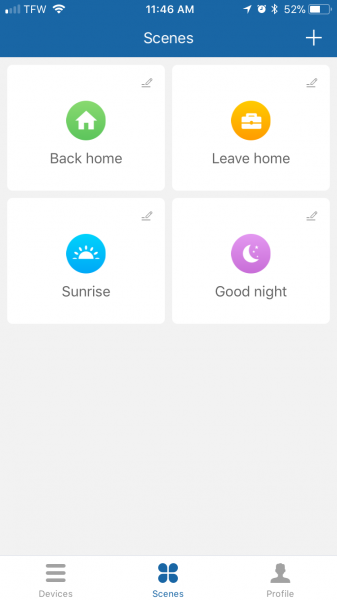
The app is intuitive and has some desirable features.  There are several app screens one can use to turn the sockets on or off, each with different capabilities. There are also simple and complex timers and scenes that can be created. Scenes can be triggered by temperature, humidity, weather, air quality sunrise/sunset, or even another device. I found this particularly interesting as it’s possible to cascade one event through any number of Geekbes devices. Pretty slick.
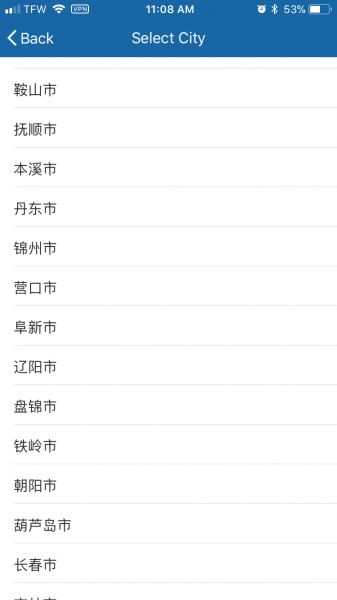
Now the bad news: Temperature settings are only available in Celsius, and the list of cities is only available in (I think) Cantonese. This makes using local area weather conditions somewhat cumbersome as I don’t know what cities are represented. As the product matures, I hope to see language options improve, making usage easier.
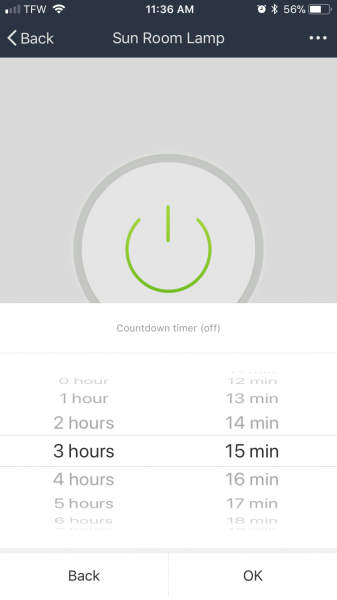
There is a one-shot timer that can be used to turn a device on or off after a configurable delay, up to 23 hours, 59 minutes. I’ve used this function to keep the living room light on long enough to allow me to walk to the bedroom without tripping over the cat. Additionally, any number of schedules can be created to turn devise on or off at a specified time, on specific days. Think of this function as a lighting timer on steroids. For security, this works great, but I would eventually like to see the ability to turn lights on and off randomly within +/- 15 minutes of the scheduled time. This would give the home a much more “lived in” appearance as none of us turns the lights on or off at exactly the same time every day and helps avoid the “Home Alone Silver Tuna” phenomena.
Linking the Geekbes app to Alexa was as simple as opening the Alexa app and adding the skill. Alexa integration works flawlessly with a lag of only a few seconds. My wife and kids love this.

What I like

  • Well-constructed
  • Easy configuration
  • Capable app with many timing and automated control options
  • Alexa  and IFTTT integration

What needs to be improved?

  • City list in other supported languages (English, German and, Japanese are stated, but not available) is needed.
  • Fahrenheit temperature settings would be welcomed.

Final thoughts

I found the Geekbes WiFi smart plugs to be reliable, convenient and simple to set up. While some enhancements to the app would be welcomed, the system performed well. I am also particularly fond because my daughter has the habit of leaving every light in the house burning. From outside, my house looks like a cruise ship. Being able to turn lamps and other devices off without chasing my daughter all over the house is priceless.

Price: $29.99 for a pack of two
Where to buy:Amazon
Source: Geekbes

The post Geekbes USB Smart WiFi Plug review appeared first on The Gadgeteer.

Filed in categories: Reviews

Tagged:

Geekbes USB Smart WiFi Plug review originally appeared on The Gadgeteer on April 23, 2018 at 9:00 am.

Note: If you are subscribed to this feed through FeedBurner, please switch to our native feed URL http://the-gadgeteer.com/feed/ in order to ensure continuous delivery.

A security blanket for adults that promotes good sleep

I’ve suffered with bad sleep patterns for years, but I apparently haven’t known much about a lot of the simpler things that have been used for years to promote good sleep habits.  Instead of nighttime rituals, medications, light therapy, and the like, weighted blankets have been used in niche medical communities for many to promote sleep with forcing you to change your routines.  Gravity says “recently some scientific studies have shown the benefits of sleeping under a weighted blanket.  They have been shown to help people fall asleep faster and sleep more deeply. Without a prescription, therapeutic training, or changes in their routine.”

The blanket should be weighted to about 7-12% of your body weight to simulate the feeling of being wrapped in a deep hug.  “Gravity uses the power of proprioceptive input (more commonly known as “deep touch pressure stimulation”), a well-regarded therapeutic method that stimulates pressure points on the body linked to improved sleep, mood, and relaxation.  Deep touch pressure stimulation has been shown to increase serotonin and melatonin, the hormones responsible for calming relaxation, while decreasing cortisol, the hormone responsible for stress. This natural, physiological approach decreases heart rate, blood pressure, and more, improving mood and promoting restful sleep and relaxation.”

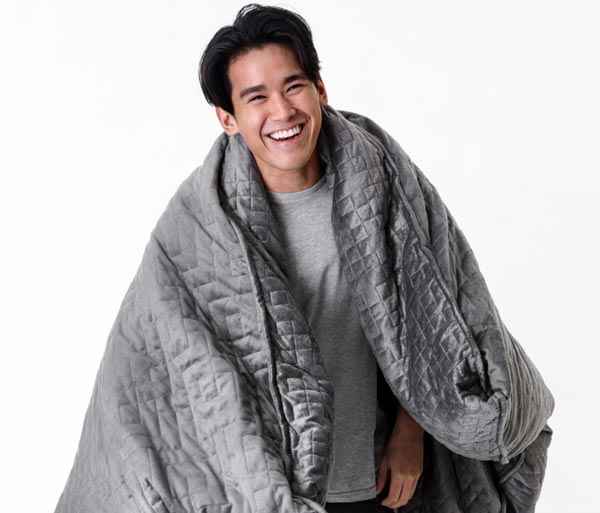
The Gravity Blanket is available in 15, 20, and 25 pound weights and is sized to be used by a single person.  The inner duvet is filled with micro beads for weight, and the gridded quilting pattern keeps the weight evenly distributed.  Both the inner duvet and the removable gray microfiber duvet cover are machine washable.

The normal price for the Gravity Blanket is $279.00, but any weight is now available for $249.  Learn more and purchase your own Gravity sleep blanket at the Gravity website.

The post A security blanket for adults that promotes good sleep appeared first on The Gadgeteer.

Filed in categories: News

Tagged:

A security blanket for adults that promotes good sleep originally appeared on The Gadgeteer on April 23, 2018 at 8:00 am.

Note: If you are subscribed to this feed through FeedBurner, please switch to our native feed URL http://the-gadgeteer.com/feed/ in order to ensure continuous delivery.
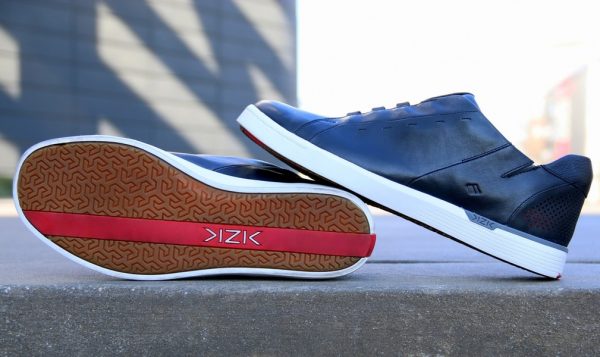
Kizik handsfree sneakers feature Foot Activated Shoe Technology

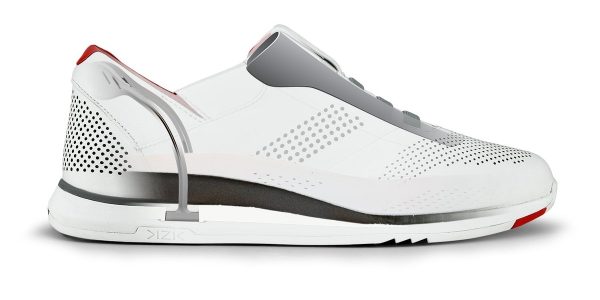
Kizik design recently announced the launch of a new product line: a luxury handsfree sneaker designed for men and women. The shoe’s materials include 100% top grain leather and other premium textiles to ensure they are durable enough to provide enjoyment for many years. They come in three styles and multiple colors and textures for men and will be expanded to include a women’s line in the fall of 2018. The style in the picture above is the New York in Black.

Why are shoes a gadget?

The shoes feature a patented design that Kizik has dubbed F.A.S.T.® (Foot Activated Shoe Technology). The elements of F.A.S.T. include a wing at the top of the heel to let your foot in and out, a heel which collapses to let your foot in, a rigid tongue to ensure a hands free experience, and an adjustable width set by velcro on either side of the tongue. The shoes utilize a titanium wire to provide the spring necessary to allow the foot to enter hands free. The use of a wire spring provides all the energy to make this shoe work. As a result, the shoes fit automatically without using complex mechanics or electronics. The shoes are step-in and are different from sandals which are slip on. Unfortunately, no information is available about how to take off the shoes – is this process hands free too?

For more info

KIZIK shoes retail between $180-$190. They are available for purchase on KIZIK.com as well as in 17 locations nationwide, including select Dillard’s stores and Dillards.com. More information is available on their Facebook page here.

The post Kizik handsfree sneakers feature Foot Activated Shoe Technology appeared first on The Gadgeteer.

Filed in categories: News

Tagged:

Kizik handsfree sneakers feature Foot Activated Shoe Technology originally appeared on The Gadgeteer on April 22, 2018 at 4:15 pm.

Note: If you are subscribed to this feed through FeedBurner, please switch to our native feed URL http://the-gadgeteer.com/feed/ in order to ensure continuous delivery.
This helmet protects your melon and is easy to carry when you’re not wearing it

I was reading an article this week about head injuries. It mentioned that even one minor head injury can lead to a greater risk of developing Parkinson’s disease. That’s why you should always wear a helmet when you ride your bike. Helmets aren’t sexy and they bulky to carry when you’re not wearing them, which might be why some people skip them.

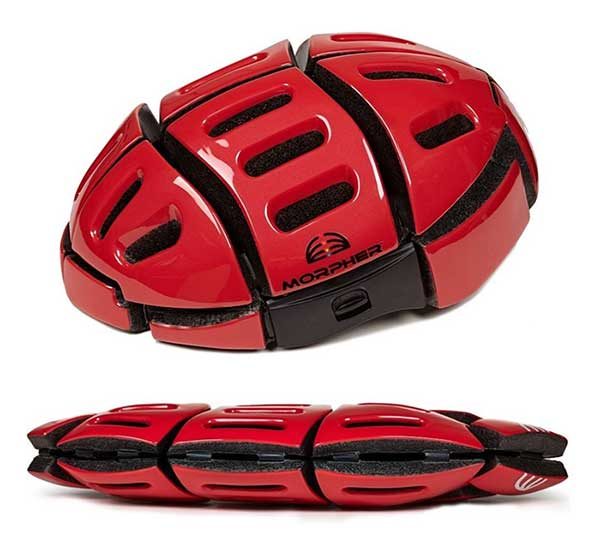
The Flat Folding Helmet from Morpher might not be sexy, but at least it solves the bulky problem because it’s foldable. The helmet features a design that allows it to collapse in half, with strong magnets that hold it closed when you don’t need to wear it. With the helmet folded, it can easily fit in your bag.

The Morpher Flat Folding Helmet is available in several colors and is priced at $149. You can find more info at morpherhelmet.com and buy one on Amazon.

The post This helmet protects your melon and is easy to carry when you’re not wearing it appeared first on The Gadgeteer.

Filed in categories: News

Tagged: ,

This helmet protects your melon and is easy to carry when you’re not wearing it originally appeared on The Gadgeteer on April 22, 2018 at 11:00 am.

Note: If you are subscribed to this feed through FeedBurner, please switch to our native feed URL http://the-gadgeteer.com/feed/ in order to ensure continuous delivery.