Jabra Bluetooth headset, North St. duffel bag, Xiaomi Mi Sphere Camera, and more – Weekly roundup

Grab your favorite beverage, find a comfortable seat, and enjoy a causal journey through an expertly crafted listing of all the news, reviews, and articles that we published this week on The Gadgeteer.

Reviews

HP df1050tw Wi-Fi Photo Frame review

Leacarve Leather Briefcase Review

Wofalo Wireless Charger Power Bank Review

Nuheara IQbuds intelligent truly wireless earbuds with BOOST review

BESTEK 3 AC Outlets 2000W Power Inverter review

North St. Bags Scout 21 VX Duffel review

NazTech MagBuddy phone mount system review

Zyxel Multy X Tri-Band modular WiFi review

Xiaomi Mi Sphere camera review

Epson Expression Premium XP-6000 All-In-One Printer review

Jabra Elite 65e headset review

Denon C820 Dual-Driver In-Ear Headphones review

VAVA E-Touch Phone Holder for Car, Electric Auto Lock iPhone Mount review

Minger LED Smart TV Backlight kit with Camera review

Kitbeez True Wireless Earbuds with Power Bank review

Articles

Julie’s gadget diary – 5 lessons I learned from my last vacation

News

Carved wallets are as flexible as leather – but made of wood!

Cross and TrackR have another way to prevent losing your favorite pens

The Rolgear multi-bit ratchet screwdriver is buttery smooth and quiet

Give a little stability and extra leak-proofing to those indoor puppy training pads

The PLX Devices Kiwi 3 OBDII tool will allow you to just relax and drive

BIC pen with 3 colors of ink pens and a mechanical pencil built in

The Mount Genie Smart Home Shelf is smart decor for smart devices

KarTent is the king of cardboard camping!

With the Bruw you can use mason jars to make delicious cold brew coffee at home

Baron Fig Card Sleeve fits with simple, minimal style

Rid your home of hot and cold rooms with help from the Keen Home Zoning System

Linedock may finally be the right answer for photographers, videographers and filmmakers on the go!

This power cord uses witchcraft to light up when it gets near an outlet

Hate washing dishes by hand? Here’s a dishwasher that fits in even the tiniest kitchen.

Brydge bridges the gap between the iPad and MacBook with the new 12.9 Series II Bluetooth keyboard

Life is too short for dumb nightstands – Part Deux!

Maximize your shoe storage space with the elfa utility Door and Wall Rack for Shoes

Camera gear, wireless doorbells, retro keyboards, GoCube, and more – Notable crowdfunding campaigns

Nite Ize packs a lot of functions into a mini flashlight

Presidio Grip World Edition iPhone X cases may offer the best protection yet

The post Jabra Bluetooth headset, North St. duffel bag, Xiaomi Mi Sphere Camera, and more – Weekly roundup appeared first on The Gadgeteer.

Filed in categories: News

Tagged:

Jabra Bluetooth headset, North St. duffel bag, Xiaomi Mi Sphere Camera, and more – Weekly roundup originally appeared on The Gadgeteer on June 23, 2018 at 3:00 pm.

Note: If you are subscribed to this feed through FeedBurner, please switch to our native feed URL http://the-gadgeteer.com/feed/ in order to ensure continuous delivery.

HP df1050tw Wi-Fi Photo Frame review


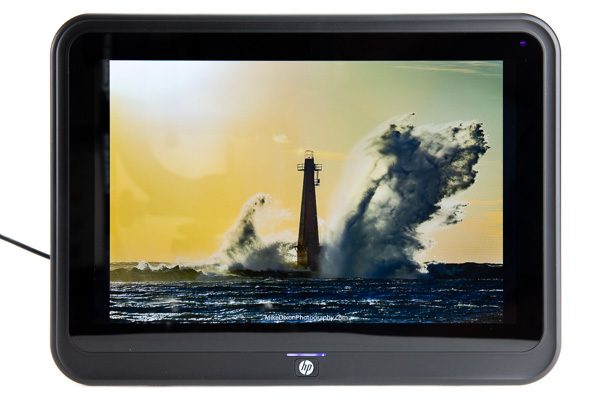
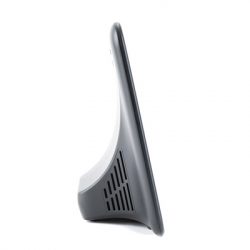
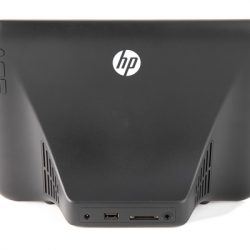
Digital photo frames have come a long way since they were first introduced shortly after LCD’s in the late 1990’s. The HP df1050tw Wi-Fi Photo Frame is no exception as it almost feels like a modern tablet.

What is it?

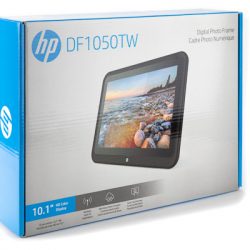
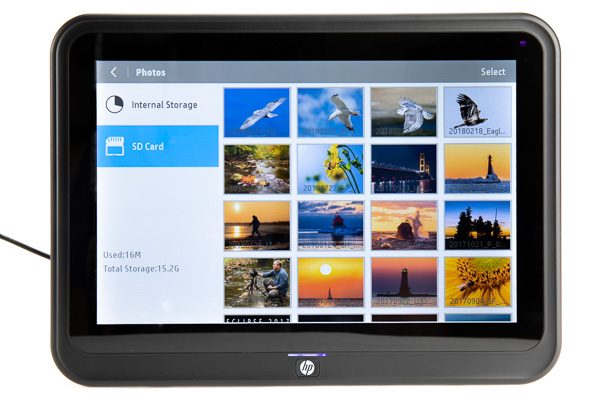
The HP df1050tw Wi-Fi Photo Frame, as its name implies, is a photo frame. However, it has a few features that make it more than just a photo frame. This HP photo frame features a touchscreen, WiFi, mobile app ability, calendar, clock and the ability to play music.

Hardware specs

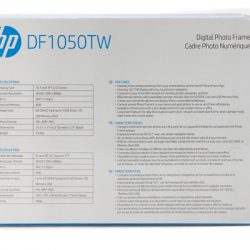
Display Size 10.1 inch TFT LDC Screen
Screen Resolution 1280 x 800px
Aspect Ratio 16:10
Internal Memory 8GB
Storage Media SD (SDHC) Card up to 32GB (Class 10), USB Memory Stick
Touchscreen Yes
Speakers 2x 2W
Sensors Light
Photo Format JPG, BMP, PNG
Music Format MP3
Power AC 110~240V 50/60Hz, DC 5V/2A
Color Black, Rose Gold, White

What’s in the box?

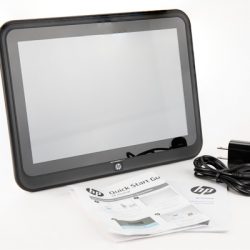
  • HP df1050tw Wi-Fi Photo Frame
  • Power Cord
  • Quick start instruction sheet


Design and features

The HP Photo Frame is designed to sit on a flat surface, unlike some photo frames that can be hung on a wall. The initial setup included selecting the language and connecting to my WiFi. After displaying instructions on where to get the mobile app, the device detected that a firmware update was available, and was able to download that and update it without connecting the device to a computer as some devices do.


Connecting a mobile device is as easy as downloading the app, signing up for an account, and entering the device ID, or scanning the QR code on the tablet screen.

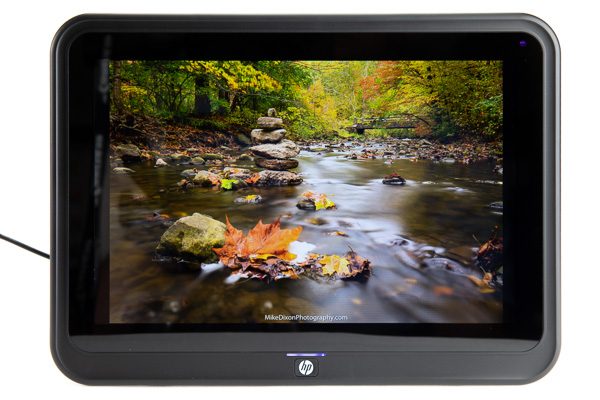
The display of photos on the screen is really nice. The colors are vibrant and the brightness is adequate. You can manually browse photos in the internal memory where the cloud photos are, or the SD card.

The photo frame and app work pretty much as designed, and for the most part they are probably adequate for most people. However, I found several things that I did not like.

The mobile app is quite basic, and poorly written. There are numerous instances of poor English and misspellings. For example, “Account” is spelled “Accout” in several places. When registering a login for the app you’re prompted to enter “Account, Password, and Nickname” – “Accout” is an obvious misspelling of “Account”, but if you leave it empty and try to create an account you’re prompted with “Username can’t be empty” – so it’s really your username. However, on the login screen of the app, it shows Username and Password. There is no password length enforcement for security either. Account and Username are used interchangeably in various messages.

If the wireless is turned off on the frame and you try to add the device via the app, the device list in the app displays “Req..erify” which is probably short for “Require Reverify” based on the poor English in the app.

Choosing the Forgot password option in the app presents you with a screen titled “Change Password”, and fields named “Please enter the device code”, “Please enter a new password”, and “Username”. This is a completely non-standard way of handling a forgotten password.

After you have selected photos on your phone and sent them to the device, there’s no indication of which photos you have already uploaded. If you select a duplicate photo you’ll have two of the same image on the device. There’s also no way of undoing a transfer so if you send the wrong photo to the device, it can only be removed from the photo frame using the photo frame user interface.

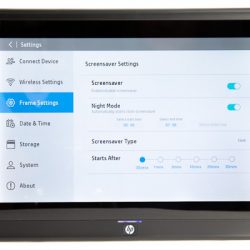
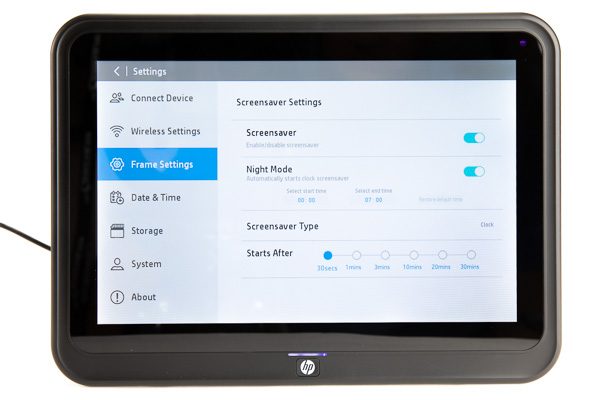
On the photo frame itself, there is an option for a screensaver, where you can set hours for it to display a clock at night for example. However, when the screensaver turns off at the end of the set period of time, there’s no way to make it automatically display the photos on an SD card, only the internal memory.

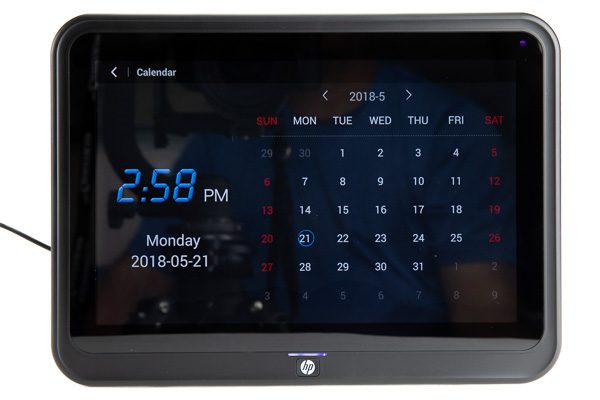
There is also a calendar option, which I thought was a really nice feature. Built-in stereo speakers and a music player provide for playing MP3 files.

The photo frame also has an alarm feature, which took me a little while to find the settings for. You have to tap the clock on the menu screen to access the alarms. After which you can set up multiple alarm times, alarm ringtones, and which days to repeat the alarm. There 7 ringtones for the alarm, but two of them sound identical.

What I like

  • Responsive and nice looking touchscreen
  • Additional features such as alarm and clock

What needs to be improved

  • Mobile device app needs much work
  • Advertises 8GB internal storage, but only 5.6GB is free to use for photos
  • In settings, if the current time is between the times set for the Night mode, you can’t change the screensaver type
  • No wall mount

Final thoughts

The mobile app needs much more work to make this photo frame a family and friends device. There needs to be a way to manage photos remotely from the app. I had thought about putting one of these at my mom’s house so I just load my most recent photos automatically to the frame but without the ability to remotely remove photos that option is not realistic.

Price: $149.99
Where to buy: Amazon
Source: The sample of this product was provided by Idea Electronics.

The post HP df1050tw Wi-Fi Photo Frame review appeared first on The Gadgeteer.

Filed in categories: Reviews

Tagged:

HP df1050tw Wi-Fi Photo Frame review originally appeared on The Gadgeteer on June 23, 2018 at 2:05 pm.

Note: If you are subscribed to this feed through FeedBurner, please switch to our native feed URL http://the-gadgeteer.com/feed/ in order to ensure continuous delivery.

Leacarve Leather Briefcase Review


The nature of my business requires me to carry things with me every day.  Laptops, papers, writing instruments, folders, cables, portable batteries, and on and on.  So having a bag that is utilitarian is important.  And it wouldn’t hurt to have a bag that looks good too.  I have always been partial to leather bags because of the look, feel, and aroma.  So when I saw the Leacarve leather briefcase I was excited to try it out.  Would it fit the bill in my daily life?  Let’s find out.

Bag Specifications

  • Material: Genuine High Quality Leather
  • Compartments: 3  Large Compartments
  • Pockets: 2 Pen Pocket, 1 Card Holder, 1 Wallet Section
  • Laptop Size: Perfect for 15.6″ or Smaller Size Laptop
  • Lock: Exclusive Swiss Lock
  • Straps: Detachable And Adjustable Shoulder Strap
  • Handle: Sturdy Top Handle
  • Closure: Zipper Closure
  • Space: Broad space inside to keep notebooks, magazines and A4 Files
  • Size: 16.5″ L x 11.8″ H x 5.6″ W

Design and function

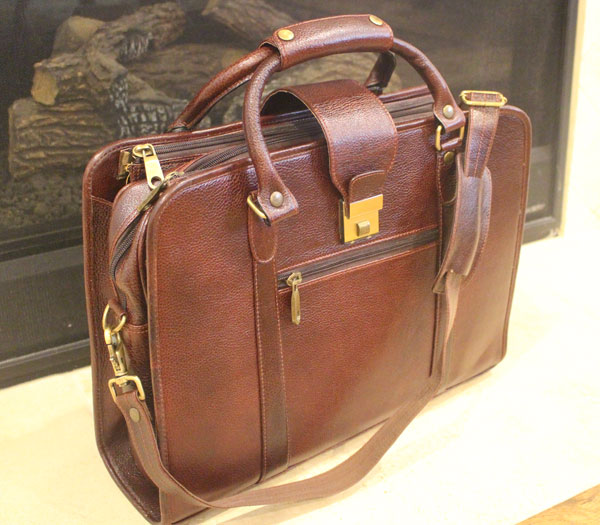
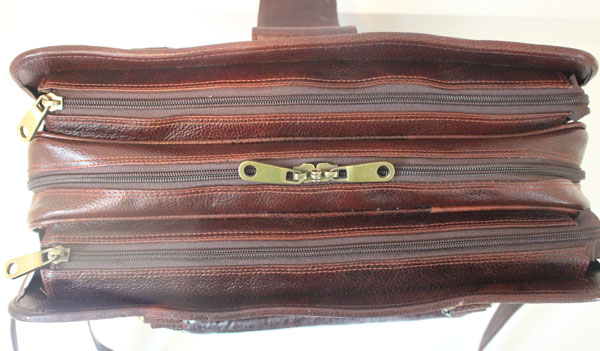
With the Leacarve leather briefcase, I have found my daily-carry bag.  No matter where I am going, or what I am wearing, the bag looks great.  The function is exceptional.  With 3 large compartments I can load it up with lots of items and segregate them as needed.  Each compartment expands to enable you to store a bunch of stuff, or collapse them to make the bag appear slender if you aren’t carrying alot.

There are regular and zippered pockets inside that can hold the little things that you don’t want scattered everywhere, like USB drives, post-it pads, keys, paperclips, pens, and so forth.  I hate it when those things roll around the bottom of the bag and make it a hassle to fish them out.  So keeping everything secure is always a plus.

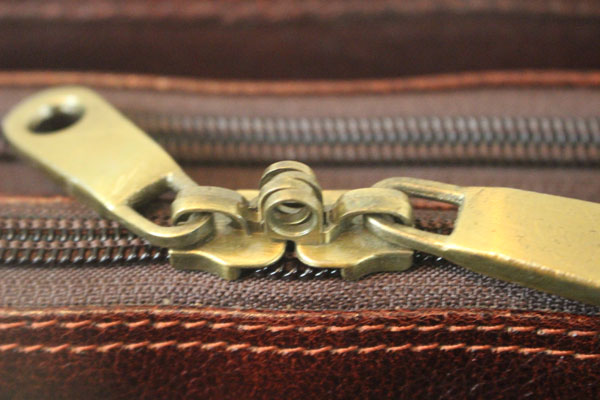
The center compartment is where your laptop goes, with a vertical padded divider with a Velcro closure.  The bottom of the bag doesn’t have a padded layer, so I wouldn’t just drop the laptop in there and let it hit the bottom of the bag, so be careful about that.  The center compartment also has the ability to use a small padlock to secure the 2 zippers when you zip that compartment closed.  That won’t prevent someone from just walking off with the bag, but it would be at least a simple deterrent to someone grabbing your laptop and walking off.

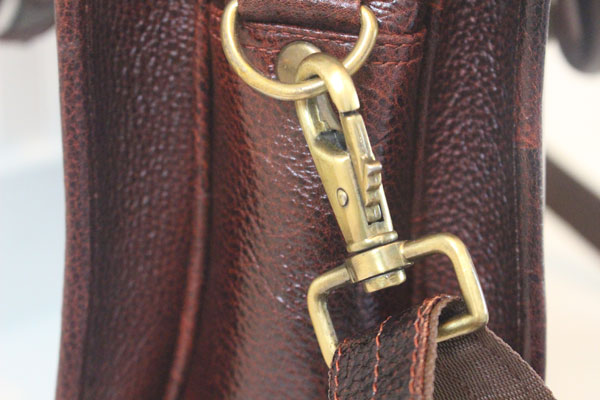
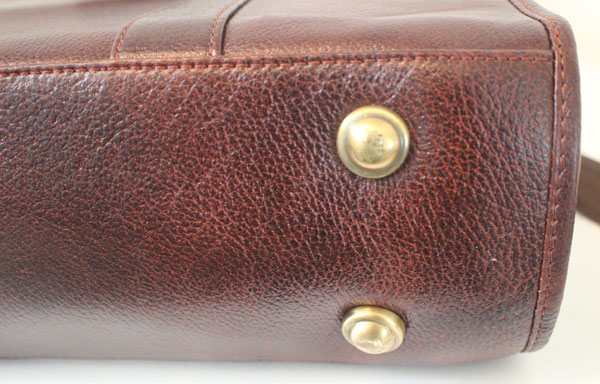
There are brass feet on the bottom that enable the bag to stand on its own, and brass fittings all around from the zippers to the loops that connect the shoulder strap.  The handle on the top of the bag snaps close and it is soft and supple so it’s a joy to carry.  The outside zippered pocket is also very handy for storing the things you might need when traveling and don’t want to have buried in the bag.  Things like your wallet, passport, boarding pass, and so forth.

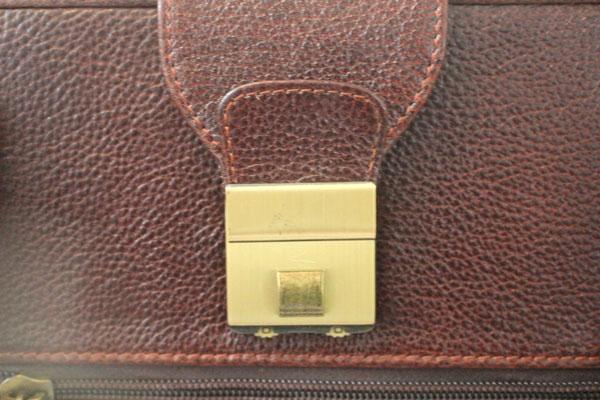
Finally, there is a wide leather strap that is attached to one side of the bag and folds over the top of the bag to connect to the lock that sits just above the zippered pocket.  It’s a Swiss combination lock that has 2 small wheels with numbers on them that rotate.  You can close the lock without having the numbers set to your combination but you can’t open it without having the numbers set properly.  Again, this won’t prevent someone from walking off with the bag, but it does provide at least a simple level of protection from someone rummaging through the bag without your approval.  I will also mention that the numbers are so small that I couldn’t see them without my reading glasses.  The hazards of getting old I suppose.

What I like

  • The quality of the leather and workmanship is top notch.
  • The seams appear to be quality and I imagine this bag lasting for years.
  • The insides of the compartments are lined
  • The zippers are sturdy and glide smoothly

What needs to be improved

  • I wish there was padding under the laptop compartment to cushion it in the bag.
  • The Swiss lock numbers can be difficult to see for those of us who normally need reading glasses

Final thoughts

This leather briefcase by Leacarve is the briefcase that I have been looking for.  It is big enough to carry everything I need, yet can be small enough to not be bulky.  It has a multitude of pockets and compartments to handle all my needs, and I can secure the compartments if I want.  The brass feet on the bottom allow the bag to stand on its own, the handle and shoulder strap enable multiple ways to carry the bag, and it smells divine.  This bag has the quality and design of a much more expensive bag, so $149 is a great deal.  I highly recommend it.

Price: $149.00
Where to buyLeacarve
Source: The sample of this product was provided by Leacarve

The post Leacarve Leather Briefcase Review appeared first on The Gadgeteer.

Filed in categories: Reviews

Tagged: ,

Leacarve Leather Briefcase Review originally appeared on The Gadgeteer on June 23, 2018 at 9:30 am.

Note: If you are subscribed to this feed through FeedBurner, please switch to our native feed URL http://the-gadgeteer.com/feed/ in order to ensure continuous delivery.

Carved wallets are as flexible as leather – but made of wood!

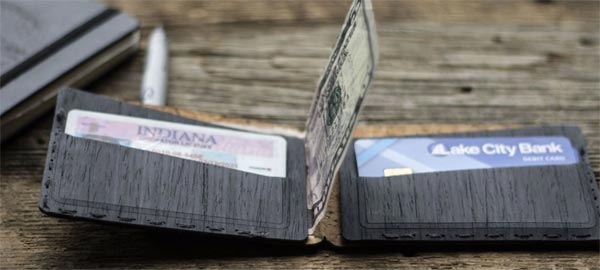
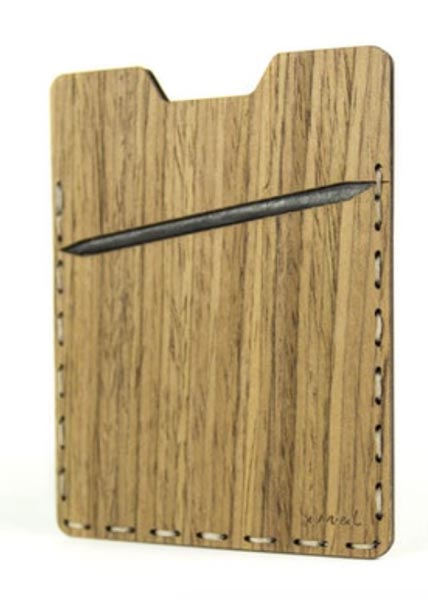
Carved makes wallets like you’ve probably never seen before.  Although they are styled like leather wallets and are as flexible as leather, these wallets are made of wood.  Carved finishes the wood with their own mixture of oils and waxes to protect it.  As a bonus, their finishing method, as they say, makes the wallets smell amazing.

The wood is backed with Tyvek and the wallets are hand-stitched.  They are made using cherry, walnut, walnut burl, ebony, or padauk woods.  Three styles are available:  minimalist, bifold, and card carry.  The minimalist wallets are for the person who only needs 3-4 cards and 3-4 bills (though you could squeeze in a couple more, if you really needed).  The bifold has two slots to hold a couple of cards each and a full-length section to hold bills, and the card carry wallet has four sections to hold cards and some folded bills.

Carved wallets are handmade for you in Indiana.  Prices are $35 – $60, varying with the wood type and the style.  Learn more at the Carved website.

The post Carved wallets are as flexible as leather – but made of wood! appeared first on The Gadgeteer.

Filed in categories: News

Tagged:

Carved wallets are as flexible as leather – but made of wood! originally appeared on The Gadgeteer on June 23, 2018 at 8:24 am.

Note: If you are subscribed to this feed through FeedBurner, please switch to our native feed URL http://the-gadgeteer.com/feed/ in order to ensure continuous delivery.

Julie’s gadget diary – 5 lessons I learned from my last vacation


I recently returned from an epic vacation to California where Jeanne and I explored 3 different locations over the course of 7 days.  As with most trips, I always struggle with the gear that I want to take with me. I am a minimalist at heart, so I like to pack the least amount of items while getting the greatest benefit from their usefulness. My biggest gear decisions for this trip were whether I wanted to take my 12-inch MacBook or my Samsung Galaxy Tab 3 Android tablet and if I wanted to splurge and buy a small camera just for the trip.

Time to pack the gadgets

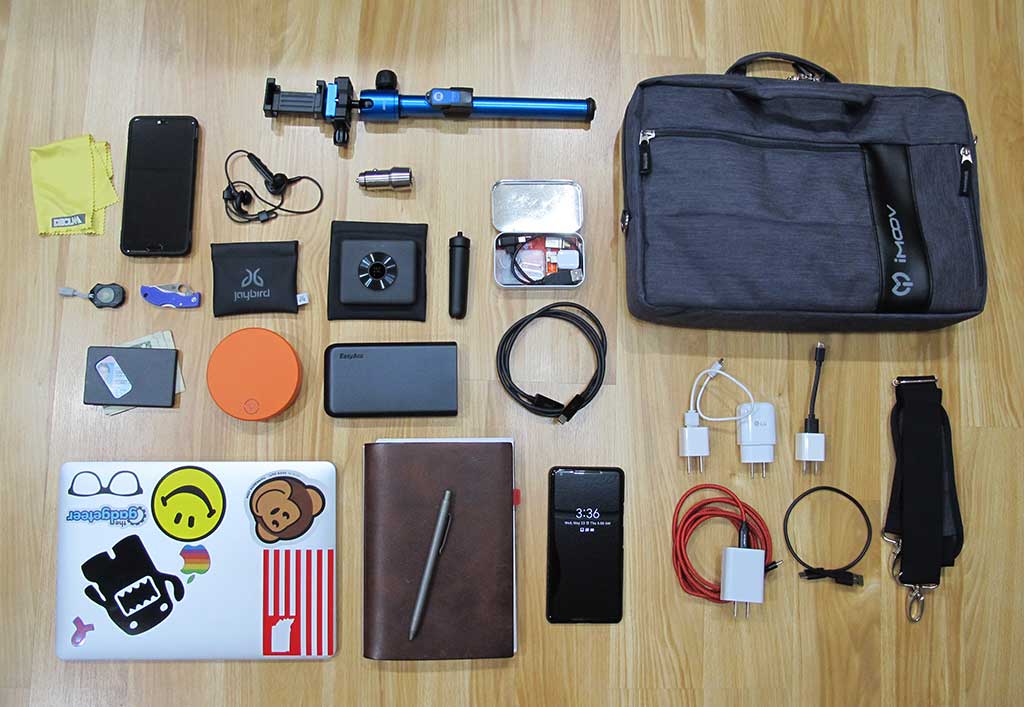
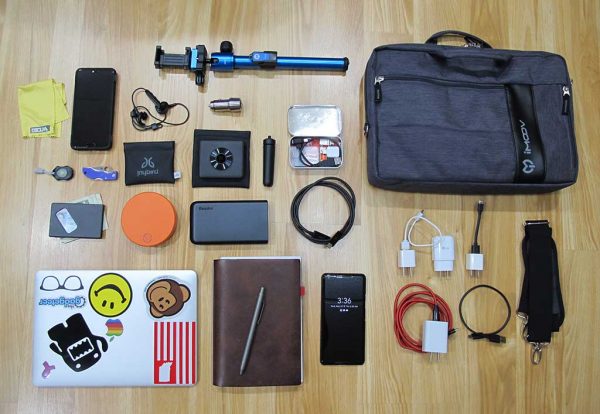
In the image above, you can see the tech that I took with me on this trip. Here is the list of items:

12-inch MacBook
Pixel 2 XL
Huawei P20 smartphone
Xaiomi Mi Sphere Camera
Skyroam SOLIS 4G LTE Global WiFi hotspot
Identity wallet
Selfie stick portion of the MeFoto Backpacker Air tripod
Jaybird Freedom 2 Bluetooth earbuds
EasyAcc MegaCharge Doubin 16750mAh USB-C Power Bank
X47 journal
Big Idea Design Ti Click Classic pen
Altoids tin with small cables, adapters, and thingamabobs
Lens cleaning cloth
Photon X-Light Macro flashlight
Spyderco Ladybug pocket knife
ThanoTech stainless steel USB car charger
Various cables and AC chargers
Generic shoulder bag

Other items that I packed but weren’t included in the photo above include:

SCOTTeVEST Hoodie Cotton jacket
Showers Pass Trailhead Bamboo-Merino Wool hoodie
Duluth Trading Company firehose cargo pants

Every time I go on a vacation, I revisit the idea of only taking a tablet and then every year that I do that, I complain that the experience was painful because I wasn’t able to get work done on the tablet as easily as I can on the MacBook. I’m happy to report that I saved myself that headache this year and decided to take the MacBook. In the end, the 12-inch MacBook takes up less space than a 10-inch tablet, a Bluetooth keyboard, and a Bluetooth mouse. Also, I didn’t need to take the dedicated Apple power adapter because the MacBook uses USB-C, so I was able to use the same charger for it as I used for my phones.

I mentioned that I also toyed with the idea of purchasing a camera just for the trip because I knew we’d be having some excellent scenic photo opportunities. In the end, I decided NOT to buy a new camera because again I’m a minimalist… Also, I was packing the Huawei P20 smartphone that I was in the process of reviewing and the Xaiomi Mi Sphere 360-degree camera along with my Pixel 2 XL. So 3 cameras would be plenty right? Hmmmm, I think maybe my definition of minimalism is flawed 😉

California here we come!

The trip started with us flying from Indianapolis to Dallas and then from Dallas Texas to Fresno California. During that leg of the trip, I used my Pixel to surf, keep up with emails, read news feeds, and read a few pages here and there on the book I’m currently reading (Chaser by John W. Pilley). I also ended up using the EasyAcc power bank while waiting in the Dallas airport for our connecting flight because all the outlets and charging stations at our gate were already being used by other people. I think this might be the first time that I’ve actually used a power bank for real-world use instead of just testing it for a review. It worked out great and allowed me to easily top off my Pixel’s battery before and during a couple of our flights.

When we landed in Fresno, we were greeted by a display that reminded us why we were there in the first place. Giant Sequoia trees! So we grabbed our bags, got a rental car, plugged in the ThanoTech car charger and used my Pixel 2 XL to navigate us to King’s Canyon National Park and the John Muir Lodge where we would be staying.

Lesson 1 – Offline Google Maps are your friend

Make sure you download your Google Map trip navigation info on your phone before you get into the middle of the drive to your destination. I already knew that cell coverage was going to be pretty much non-existent inside the King’s Canyon National Park, but it was also spotty on the drive from Fresno to the King’s Canyon National Park. That’s why I was really glad that I had planned ahead and had set up Google Maps on my phone with an offline map/directions from the airport to the park and also from the park to our second destination.

The drive from the Fresno airport to King’s Canyon National Park inside the Sequoia National Forest was our first taste of California and it didn’t disappoint.



Jeanne who loves plants and flowers kept wanting to stop at every turnout (wide gravel berms on the side of the highway where you can pull over so faster drivers can go by) so she could see and photograph various wildflowers that we don’t see in Indiana.

The scenery changed dramatically from what looked and felt like a desert landscape into a fairy tale world as soon as reached the Sequoia National Forest.

This was our first look at one of the giant sequoia trees as we drove into the King’s Canyon National Park which is inside Sequoia National Forest. We were impressed and had to get out and snap a few pictures. We would soon come to learn that this one was just a ‘baby’ compared to others we’d see the following day.

We checked into our room at the John Muir Lodge and then had a quick dinner at the lodge restaurant where they had free (although insanely slow) WiFi. Afterward, we went back to our room where I promptly crashed due to not sleeping at all the night before in the hotel where we had stayed near the Indianapolis airport so that we wouldn’t have to get up so early to drive from Columbus to Indy for our 8am flight to Fresno, CA. I ended up sleeping from 6pm to about 8am the next morning. I guess I was tired and the time difference from EST to PST caught me.

When we got up that next morning I checked again to see if I had any T-mobile coverage and nope, nothing. Then I checked to see if there was open WiFi in the room. Nope. Then just for kicks, I tried the Skyroam 4G WiFi hotspot. Again nothing. I wasn’t surprised though as I already knew I was going to be off the grid during the first part of our vacation. I’d already prepared to be incommunicado by scheduling Gadgeteer news and reviews posts for several days in advance and I surrendered to the fact that I would be able to catch up on emails once we made our way over to the coast to our final vacation destination in Carmel.

What I hadn’t completely prepared for was just how freaking cold it was in King’s Canyon National Park. We had checked the weather for King’s Canyon when we were packing before we left Indiana and thought the forecast was screwy because it had shown temps in the 30’s and 40’s. We figured it was showing the forecast for farther up in the mountains or something. But when I checked out on the porch outside our room at the lodge that morning, I was pretty surprised by how cold it was. But it wasn’t just cold, it was also foggy and drizzling. Luckily, we’d each brought sweatshirts, along with t-shirts and a jacket.

Lesson 2 – I still love my SCOTTeVEST Hoodie

When we were packing for the trip, I had originally decided to take the BauBax Women’s Sweatshirt jacket because I’d just posted my review but hadn’t actually put it through any real-world travel scenarios and wanted to do so for a later review update. But in the end, I changing my mind and packed the SCOTTeVEST Hoodie Cotton Jacket because I just like the SeV jacket better.

I’m glad I did make the swap because the SeV jacket is a heavier weight and kept me warmer than the BauBax would have been able to do. The SeV jacket also has a better layout of pockets that were perfect for 2 phones and the Xiaomi camera that I carried with me every day while on the trip.

That first day we walked around looking at some of the trees in King’s Canyon near the John Muir Lodge where we were staying. But the weather was so bad and it was so foggy that we packed it in earlier than anticipated and drove to our 2nd destination which was Three Rivers.
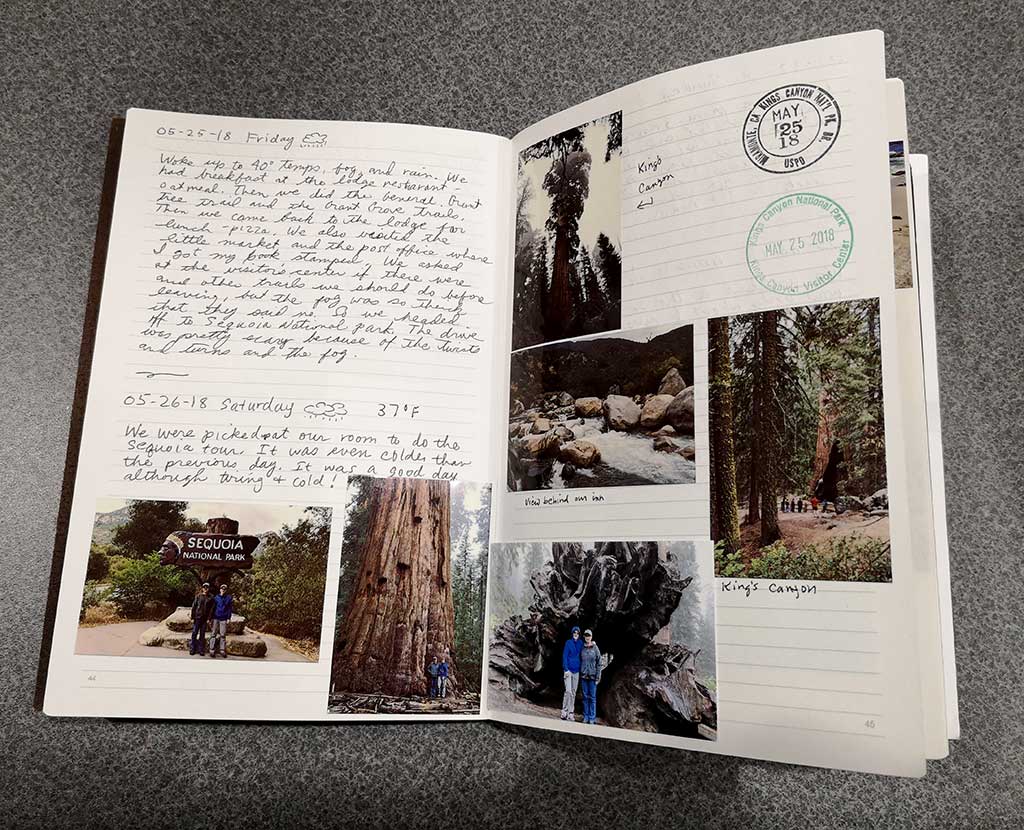
But before we left King’s Canyon National Park, I got my journal stamped. One stamp was a postmark from the tiny post office near the lodge and the other one was from the park visitor center. And that’s one reason why I still love my paper journals. I like collecting little mementos to tape, or glue in my journal so I can flip back and remember the fun we had and things we did and saw.

Lesson 3 – Don’t forget the panorama mode on your camera

The panorama mode on my smartphone’s camera isn’t normally something I think about using on a daily basis. But on this vacation, it was the perfect way to capture pictures of the giant sequoia trees and other landscape shots. Here are some examples which you can click if you want to see the full-sized image.





Panoramic images aren’t perfect. They often have a fisheye or warped appearance like the giant sequoia images above. But I still think they are cool because you can get all of your subject in one photo where it would otherwise only show a small portion of it.

It’s also amazing how many people don’t know about this feature. When we were on a tour of the Sequoia National Park, one of the other people with our group asked what I was doing when I was taking panos of the trees. When I showed her how to do it with her iPhone, she was overjoyed to learn that she could do that.

Lesson 4 – I didn’t have access to the internet for almost 3 full days and I survived!

When we were staying in Three Rivers, our room at the Gateway Inn had internet, so I was able to check my email and surf when we were there in the room – which was only in the morning and evening since the other part of the day we were in the park which has zero internet/cell coverage.

Before the trip, I was a little anxious about not being able to keep up on my email, news feeds, and Gadgeteer stuff. But once I gave in to the fact that I wouldn’t have control over that part of the trip, I stayed calm and carried on. It was actually pretty liberating. For someone who likes to stay connected and on top of things, this was a big accomplishment for me and I am glad that the trip worked out the way it did because now I know that taking a break from the digital world is not going to kill me. 🙂

Lesson 5 – My 12-inch MacBook is a great travel computer but for my next trip I may go with a tablet or nothing at all

Shocking right? But seriously, now that I’ve survived without working for a week, I’m going to look forward to doing that more often. Of course, it did take some preparation beforehand. I had to schedule news and review posts to publish days in advance and I had Janet take over comment moderation and take the wheel while I was away.

I also used the Newton Mail client on my phone when I needed to file emails and the Gmail app with the canned reply feature for quick responses. These two tools helped me to keep my inbox clean, which is important to me so I don’t get that I’m never going to catch up feeling that can happen when there are dozens of messages awaiting a reply.

Our next vacation is this fall when we’ll go to Sanibel Island, Florida. I’m seriously considering just taking a tablet this time. No, I’m not going to try to make it bend to my will and become a laptop. I won’t even take a Bluetooth keyboard with me. I’d just use it for surfing and a few games when the mood strikes. With Newton Mail and Gmail, I can keep my inbox clean and as for working on Gadgeteer reviews and articles, I now know that I can relax and take a vacation.

The post Julie’s gadget diary – 5 lessons I learned from my last vacation appeared first on The Gadgeteer.

Filed in categories: Articles

Tagged: ,

Julie’s gadget diary – 5 lessons I learned from my last vacation originally appeared on The Gadgeteer on June 22, 2018 at 5:09 pm.

Note: If you are subscribed to this feed through FeedBurner, please switch to our native feed URL http://the-gadgeteer.com/feed/ in order to ensure continuous delivery.